
The short answer: I’d match the setup to crew size, receipt volume, and who passes receipts to the office. For one person, phone-only scanning is often enough. For 2+ buyers, a shared inbox starts to make sense. For multi-site or multi-van teams, job folders, approval steps, and a same-day handover rule stop paperwork from slipping through the cracks.
Here’s the core of it in plain terms:
- Sole trader: use phone-only scanning
- 2+ people buying materials: move to a shared crew inbox
- Several live jobs: use job-folder batch filing
- 5+ staff making purchases: add an approval flow
- Site and office split across many jobs: set a site-to-office handover routine
A few numbers make the point fast:
- Manual entry: about 3–5 minutes per receipt
- Mobile OCR: about 10 seconds per receipt
- Around 200 receipts a month: manual admin can eat 10–15 hours
- 12 live sites: teams may deal with 180–360 receipts a week
- HMRC record rule: keep records for 5 years
- Thermal receipts: can fade in 2–3 weeks if left in a hot van
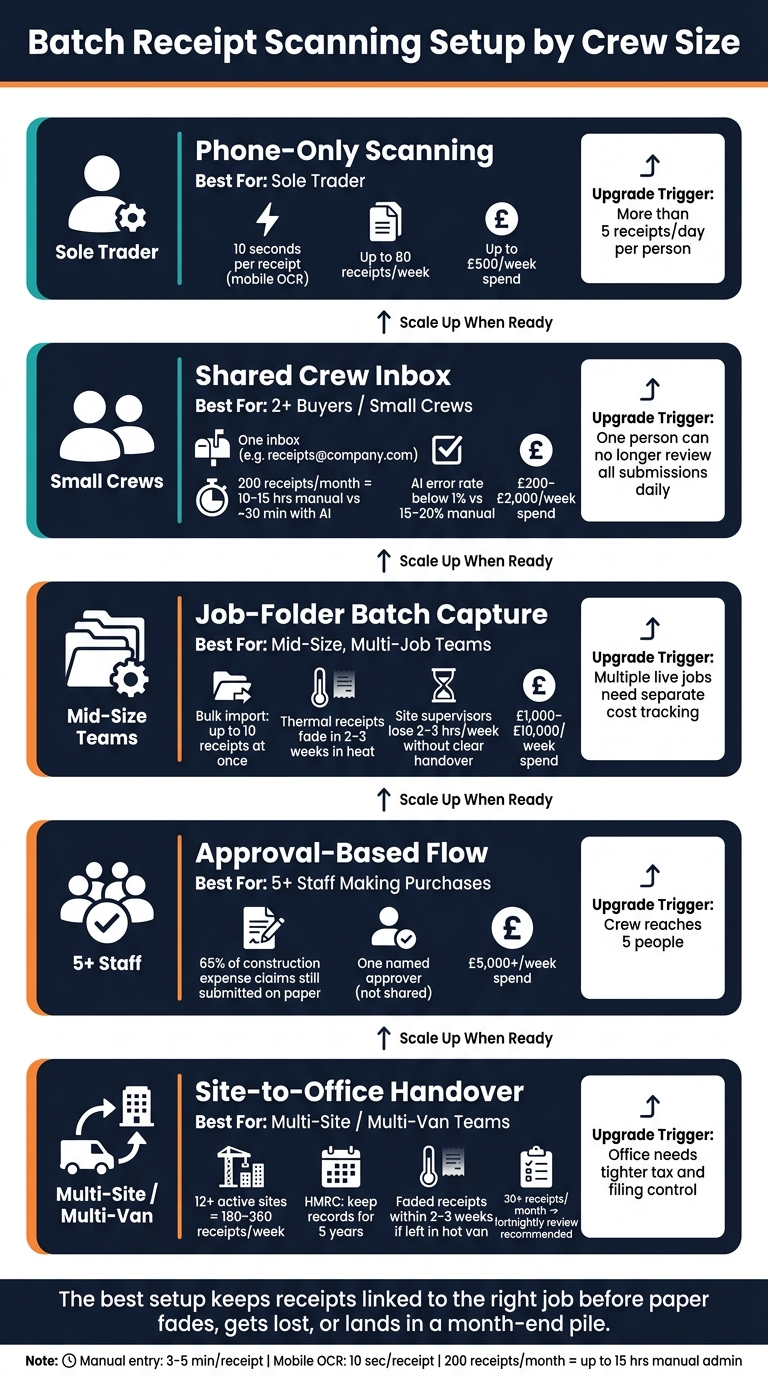
Batch Receipt Scanning Setup by Crew Size: Which Method Fits?
Quick Comparison
| Setup | Best for | Main upside | Main weak spot | Good time to move up |
|---|---|---|---|---|
| Phone-only | Sole trader | Fast, no handover | Falls apart when receipts are shared | More than 5 receipts a day per person |
| Shared crew inbox | Small crews | One place for all receipts | Paper receipts still need scanning | One person can’t check submissions daily |
| Job-folder batch | Mid-size, multi-job teams | Costs stay tied to the right job | Batch delays can lead to faded receipts | Several live jobs need separate tracking |
| Approval-based flow | 5+ staff | Clear sign-off trail | More manager admin | Team reaches five people |
| Site-to-office handover | Multi-site teams | Site and office each do their part | Missing context if handover is weak | Office needs tighter tax and filing control |
If I had to boil the whole article down to one line, it would be this: the best setup is the one that keeps receipts linked to the right job before paper fades, gets lost, or lands in a month-end pile.
sbb-itb-12417dd
1. Phone-Only Scanning
Crew Size Fit
This setup is made for one person. The person buying materials is also doing the books, so there’s no need for handovers, shared folders, or extra admin steps.
Receipt Volume Handling
A sole trader can make phone-only scanning work well if each receipt is scanned straight away, before it fades, gets crushed, or disappears. Best time? Before you leave the car park.
Mobile OCR reads the receipt on its own, taking about 10 seconds per receipt, compared with 3–5 minutes for manual entry. That speed works because one person is running the whole process from start to finish.
Job and VAT Record Control
Scan the receipt there and then, then tag it to the job or cost code while the details are still clear in your head. HMRC accept legible digital copies as evidence. Site Wallet keeps the receipt, job tag, and export together in one phone-based record.
Handover and Admin Burden
There’s no handover in this setup. That’s the big win for a one-person business.
But that same strength becomes a weak spot once receipts start moving between people. If more than one person is handling receipts, a shared inbox usually makes more sense.
2. Shared Crew Inbox
Crew Size Fit
When one person is no longer making every purchase, it’s time to move receipts into one shared inbox. This setup makes the most sense once two or more people are buying materials across different sites and suppliers. A shared address like receipts@company.com gives both the crew and the office one live record of every receipt.
From there, the big issue is volume. How many receipts is the team throwing off each week?
Receipt Volume Handling
At around 200 receipts a month, manual entry eats up roughly 10–15 hours. Add AI extraction, and that drops to about 30 minutes. That’s not a small difference. It turns a tedious admin task into a quick review job.
For a mid-sized contractor with several jobs running at once, receipt numbers can pile up fast. A general contractor with 12 active sites can expect 180–360 individual receipts a week. At that stage, relying on individual phones starts to fall apart, and centralising receipt intake becomes the only workable option.
Once receipts are coming in at that pace, every one of them needs a clear link to the right job.
Job and VAT Record Control
The easiest fix is to add the job number or project name to the email subject line. Something like Job 47 – Merchant Name gives the office enough detail to code the cost without chasing anyone for missing info.
From there, AI extraction can pull out:
- merchant name
- date
- total
- VAT
It can do this with error rates below 1%, compared with 15–20% for manual entry. Site Wallet lets crews scan and tag receipts by job from their phones, so everything stays in one shared record.
Handover and Admin Burden
This changes the admin handover quite a bit. Instead of typing in every receipt by hand, the office mainly checks the ones the system flags. That’s a much lighter workload, and it’s easier to handle as the crew gets bigger.
It also deals neatly with paper claims. A crew member can forward a digital receipt or email a photo of a paper one, and both end up in the same inbox.
3. Job-Folder Batch Capture
Crew Size Fit
Compared with a shared inbox, job folders keep each receipt tied to a site from the moment it’s scanned. That makes this setup a good fit for mid-size contractors running more than one site at a time. The receipt is linked to the job before it even reaches the office, which cuts down on mix-ups later.
Receipt Volume Handling
Each receipt goes straight into the right job folder, then gets batch processed from there. If your system supports bulk import, it can handle up to 10 receipts at once. That means less faffing about with one-by-one uploads and less back-and-forth for the team.
It also makes gaps easier to spot. If a site folder looks thin for the week, you can chase missing receipts by job instead of digging through a general pile.
Once receipts are grouped by job, coding and margin checks tend to move faster.
Job and VAT Record Control
Sorting receipts into job folders does more than keep things neat. It gives you a live view of project margins while work is still in progress, so you can spot when a job is burning through more materials than quoted. That’s a big deal on busy sites, where small overruns can snowball if no one sees them early.
Job folders also make it simpler to prove costs by site and check margins while the job is still live.
Use one naming format, such as YYYY-MM-DD_Vendor_Amount_JobCode.pdf, so files sort cleanly and export easily.
Handover and Admin Burden
The weak spot is the handover between site notes and office coding. If that link isn’t handled well, site supervisors can lose an estimated 2–3 hours a week on receipt-related admin. That’s time they should be spending on the job, not chasing paper trails.
A simple fix is exception review. The office checks only the records that are unclear, rather than reviewing every single receipt. That keeps weekly batch processing under control without turning it into a slog.
That control model leads naturally into approval-based expense flows for larger crews. This is the point where approval checks become more useful than simple filing.
4. Approval-Based Expense Flow
Crew Size Fit
This setup tends to work best once a crew has five or more people. When several employees are buying materials across different jobs, a set approval flow helps stop reimbursements from getting stuck and keeps policy checks the same across the board. Five or more users need formal sign-off. Smaller crews can often get by with a lighter check.
This becomes more important when receipts move from the site to the office. That handover is where ownership often starts to get fuzzy.
The main thing is simple: assign one named approver. Don’t split approval across a group. When approval is shared, receipts tend to sit unresolved for longer than they should.
Receipt Volume Handling
Approval works best when the system handles the first pass. That way, the approver is checking extracted fields instead of typing everything in again. It’s a review step, not a data-entry job.
The pressure here is plain enough. 65% of construction expense claims are still submitted on paper. A mobile-first approval flow helps shift that habit towards faster capture and fewer end-of-month clear-ups.
Job and VAT Record Control
Approval also helps catch miscoding before it reaches the accounts file. It closes the handover gap between the operative, who knows what was bought and why, and the office accountant, who needs the right cost code and VAT details. Skip that review step, and miscoding becomes far more likely.
Once that review step is in place, the next issue is less about coding and more about logistics: how receipts actually move from site to office.
Handover and Admin Burden
The trade-off is pretty direct. Approval adds a step, but it cuts out more work later. When corrections stay attached to the receipt, instead of being scattered across email chains, the office doesn’t have to chase missing context afterwards.
A practical way to keep approval moving is to sample-check completed reports rather than slow everything down with line-by-line checking. Full handover control sits in the next workflow.
5. Site-to-Office Handover Routine
Crew Size Fit
When site capture and office coding happen in different places, you need a clear handover routine. Without it, the receipt may arrive, but the detail behind it often doesn’t.
This setup tends to suit crews with around a dozen live jobs on the go, where site teams and office staff are working to different schedules. Once that split is in place, the next pressure point is simple: volume.
Receipt Volume Handling
Mid-size contractors with 12 or more sites can end up dealing with 180–360 receipts a week. At that level, doing full data entry on a phone starts to drag on site work, and supervisors can lose hours to receipt admin.
The sensible approach is to split the task. Site staff take the image straight away, then the office deals with coding, checks, and filing. Site Wallet can capture and tag receipts by job before the office reviews them.
Job and Record Control
The biggest risk here isn’t just losing the bit of paper. It’s losing the context around it. The site manager usually knows what was bought and why, but the office still needs the right cost code to file it properly.
Thermal paper makes that harder. Leave a receipt on a van dashboard in summer heat and it can turn unreadable within two to three weeks. HMRC requires records to be kept for five years, so a faded receipt can leave a clear gap in your records.
Handover and Admin Burden
If approval is the stage where the data gets checked, this routine helps control the transfer from site to office. A same-day submission rule - where operatives scan before leaving site - cuts out most of the chasing later on.
For crews producing more than 30 receipts a month, a fortnightly review can stop the office sleepwalking into a month-end pile-up. In plain terms, it keeps uploads up to date and cuts the usual end-of-month scramble.
Trade-Offs and Pros and Cons by Setup
Each setup tends to fail in a different way. In most cases, the tipping point is rising receipt volume, not the app, inbox or process itself.
The table below compares each setup by control, admin load and the point where it usually makes sense to move up to the next level.
| Setup | Key advantages | Main drawbacks | Best trigger to upgrade |
|---|---|---|---|
| Phone-Only | Instant capture; best for sole traders. | Daily admin rises fast with shared receipts. | When daily receipts exceed 5 per person. |
| Shared Crew Inbox | Centralises digital receipts; low effort once set up. | Paper receipts still need manual scanning. | When one person can no longer review every submission daily. |
| Job-Folder Batch | High accuracy for project profitability; handles higher volumes well. | Thermal paper can fade before the batch session happens. | When multiple live jobs need separate cost tracking. |
| Approval-Based | Maximum control; clear audit trail. | Slower reimbursements; high admin load for managers. | When crew size reaches five people. |
| Site-to-Office Handover | No tech burden for field staff. | Higher risk of missing receipts; harder to keep records audit-ready. | When the office needs tighter tax control. |
Crew size matters. But in day-to-day use, weekly receipt volume usually decides how long a setup stays workable.
| Setup | Control | Office load | Typical weekly spend |
|---|---|---|---|
| Phone-Only | High (individual) | Medium | Up to £500 |
| Shared Crew Inbox | Medium | Low | £200–£2,000 |
| Job-Folder Batch | High (project) | Medium | £1,000–£10,000 |
| Approval-Based | Very high | High | £5,000+ |
| Site-to-Office Handover | Low | Very high (office) | Breaks down under high spend. |
Approval-based flows put the most pressure on the office team, but they also give you the clearest audit trail. You can see exactly who approved each cost and when. For crews spending more than £5,000 a week across multiple sites, that extra process is often worth it.
Site Wallet fits this setup well: site staff capture receipts on site, and the office checks and codes them later.
Use these thresholds to match the next setup to your crew size.
Which Setup Fits Your Crew Size
Crew size, and who deals with receipts, usually tells you which batch-scanning setup makes sense. Once you know how receipts move through the crew, the next piece is simple: how many people are buying stuff, scanning it, and passing it on.
Phone-only scanning works well for sole traders who scan receipts the same day. A busy sole trader can rack up 50–80 receipts a week. And there’s a practical headache here: thermal paper left on a van dashboard can fade until you can’t read it within two to three weeks in summer heat. That’s why same-day scanning matters. When the person doing the books starts taking on admin as well, a shared inbox is usually the next step.
For a single-van crew - say, a lead tradesperson with an apprentice or helper - it helps to tag each receipt to the right job as soon as it’s scanned. That keeps job costing clear and saves hassle later. Site Wallet fits this setup well: scan on site, tag by job, then let the person handling the books check everything later without having to ring round for missing details.
Multi-van teams need an approval-based flow with job folders from the start. At this size, it’s not a nice extra. It’s the baseline. If receipts come in from different vans and sites with no checks in place, things can go sideways fast.
Use the table below to match the setup to the crew.
| Crew type | Recommended setup | Why it fits | Next step |
|---|---|---|---|
| Sole Trader | Phone-only scanning | Low volume; owner has full context of each purchase. | Shared inbox when admin help is hired. |
| Single-Van Crew | Job-based tagging + shared inbox | Tracks costs per job and lets the person handling the books access receipts without being on site. | Approval steps once helpers or apprentices begin making independent purchases. |
| Multi-Van Team | Approval-based flow + job folders | Prevents receipt chasing across multiple sites and keeps the audit trail clean. | Direct accounting integration for faster reconciliation. |
FAQs
How do I know when to move to a more structured setup?
Move to a more structured setup when admin starts eating into your day. The usual signs are pretty plain: too much time spent on monthly manual data entry, missing receipts, or team expenses being handled through messy email chains and shared folders.
It also makes sense when receipt volume goes up, job costing needs more detail, or a team with several people needs approval steps to stop poor spending habits from creeping in.
What’s the best way to stop paper receipts going missing or fading?
The safest approach is to digitise receipts straight away, right at the point of purchase. Thermal paper can fade fast, especially if it’s left in heat or direct sunlight, like on a van dashboard.
Using Site Wallet to photograph the receipt as soon as you get it gives you a permanent digital record. It’s backed up to the cloud and ready for HMRC.
Who should be responsible for checking and approving receipts?
Usually, two people handle this.
A manager or supervisor checks the business reason, makes sure the spend follows company policy, and confirms the receipt is tied to the right job or project. Then the finance lead, or the person who looks after the books, checks the coding and signs it off for accounting.
To stop things getting held up, assign one primary approver. Keep the receipt, the context, and the approval status together in one system so comments, checks, and audits are much easier to manage.