
best receipt scanner app
If you're a UK tradesperson or small business owner, managing receipts can feel like a hassle. But with Making Tax Digital (MTD) for Income Tax now requiring digital records for those earning over £50,000 annually (starting April 2026), it's time to simplify your process. A receipt scanner app can help you stay compliant, save time, and track expenses more effectively.
Here's a quick look at three top apps:
- Site Wallet: Tailored for tradespeople, with job tagging, petty cash tracking, and a free plan.
- Expensify: Offers SmartScan technology, mileage tracking, and team-friendly features starting at £5/user/month.
- Dext Prepare: Known for high OCR accuracy and advanced integrations, but pricier, starting at £29/month.
Each app has strengths depending on your needs, whether you're a sole trader, managing a team, or handling high volumes of receipts. Below is a comparison to help you decide.
Quick Comparison
| Feature | Site Wallet | Expensify | Dext Prepare |
|---|---|---|---|
| Free Plan | Yes | Yes (25 scans/month) | No |
| Starting Price | Free | £5/user/month | £29/month |
| Job Tagging | Yes | Yes | Yes |
| Petty Cash Tracker | Yes | No | No |
| Export Formats | PDF, CSV, ZIP | PDF, CSV, integrations | PDF, CSV, integrations |
| OCR Accuracy | AI-powered | 94%-97% (SmartScan) | 99.9% |
Choose the app that suits your workflow, team size, and budget to stay organised and compliant with HMRC requirements.
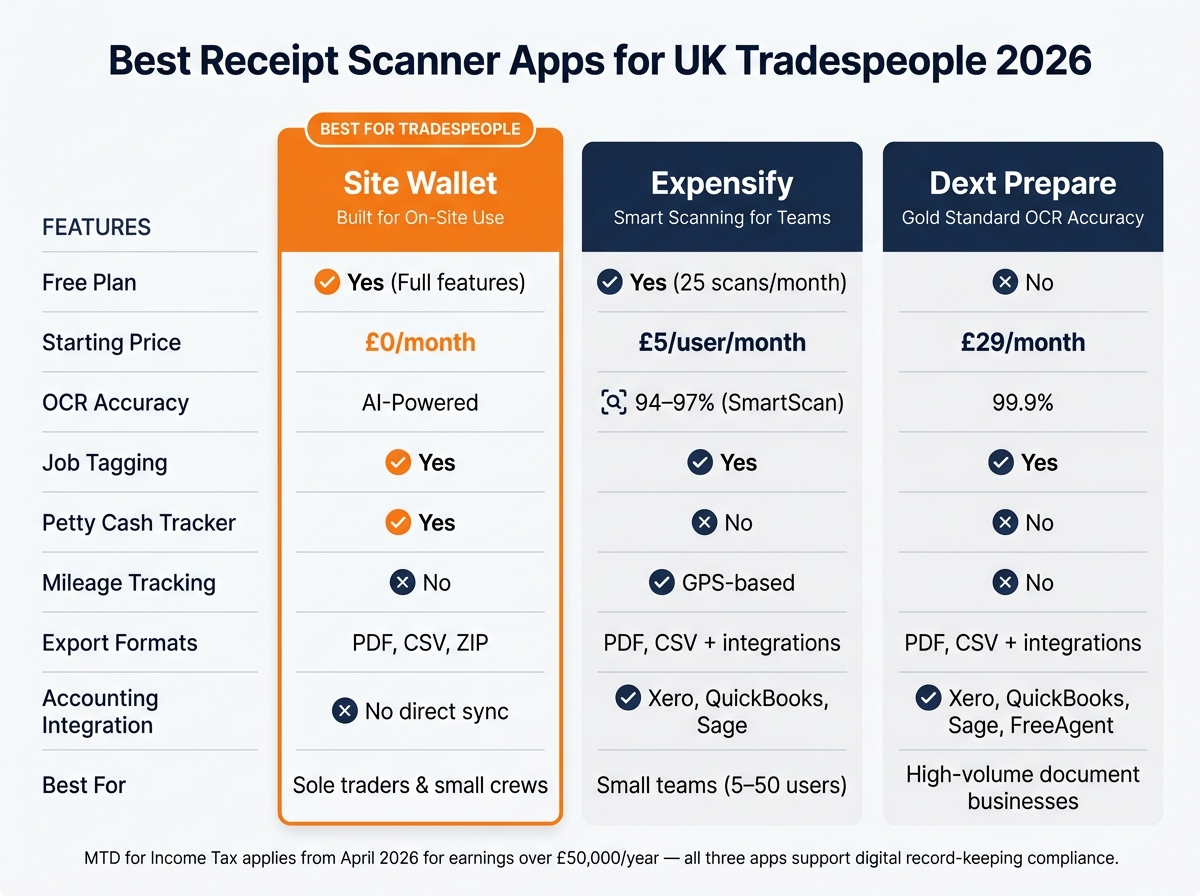
Best Receipt Scanner Apps for UK Tradespeople: Side-by-Side Comparison
Top Receipt Scanning Apps: Tested & Compared 2025
sbb-itb-12417dd
1. Site Wallet
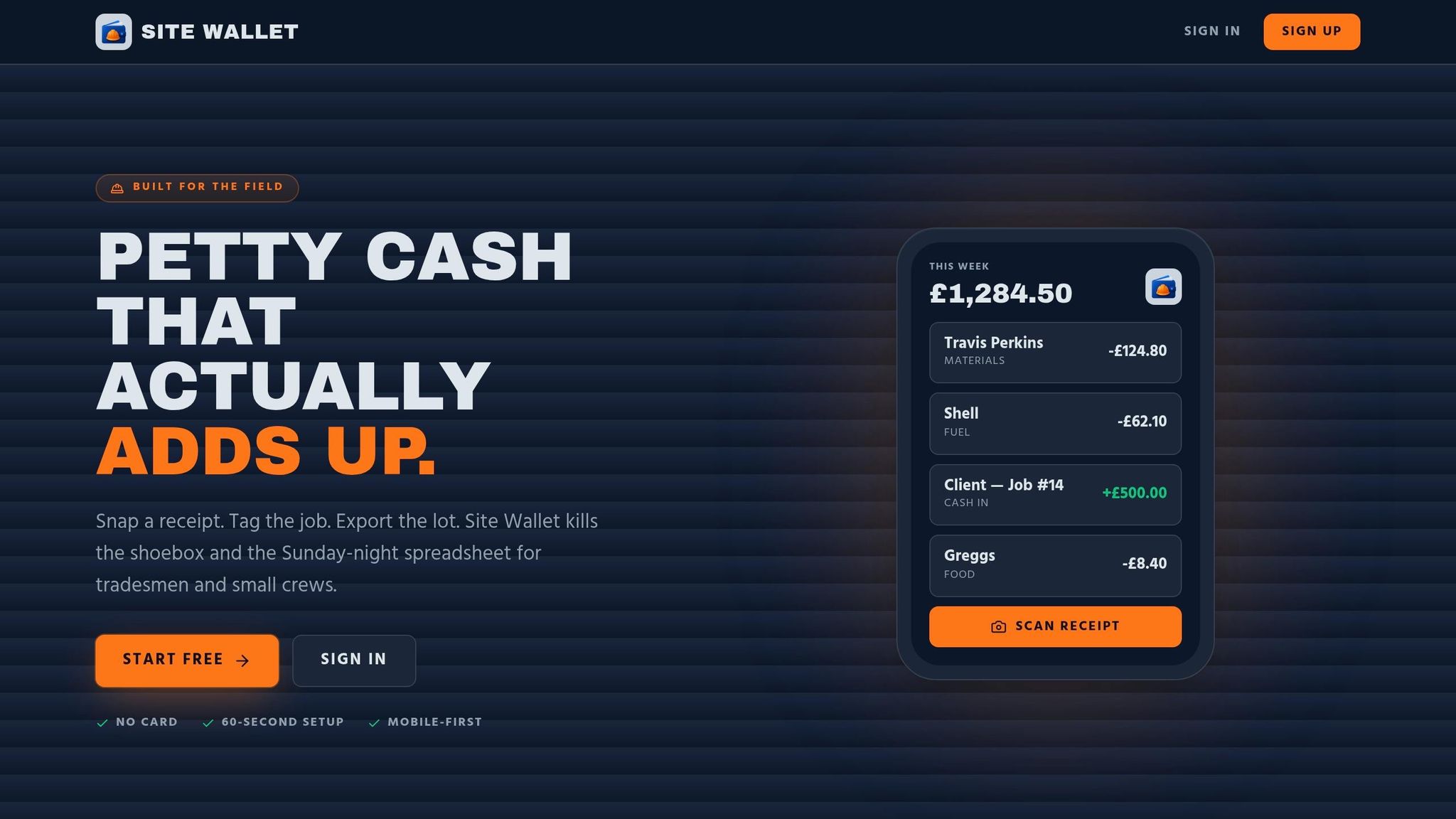
Site Wallet is tailored for tradespeople and small crews in the UK. It’s built for on-site usability, requires no accounting knowledge, and has a quick setup process.
Scanning Accuracy
With AI-powered scanning, Site Wallet extracts details like supplier name, date, total, and VAT from receipt and invoice photos. The AI then automatically categorises expenses, cutting down on the manual work typically done at the end of the week.
Expense Tracking
Site Wallet goes beyond scanning by including a Petty Cash Tracker to log unexpected daily expenses on-site. This feature is ideal for tradespeople handling costs like materials, fuel, or small tools across various jobs. Its Site Expense Overview provides daily updates on spending per site, helping you stay on top of your budget. You can also tag expenses to specific jobs, giving you a clear picture of each job's actual costs, including materials and incidental expenses.
Export Options
When it comes to exporting data, Site Wallet supports PDF, CSV, and ZIP formats, making it compatible with most accountants' requirements. CSV files are particularly handy for spreadsheet users, while PDF summaries offer a straightforward view of project costs.
Pricing
Site Wallet provides a free plan that covers receipt scanning, job tagging, cash flow tracking, and export options - perfect for sole traders just starting out. There’s also a Premium Plan with extras like batch scanning, advanced export features, and priority support. Pricing for the Premium Plan isn’t publicly listed, so you’ll need to contact Site Wallet directly for details.
These features position Site Wallet as a practical tool for managing on-site receipts and expenses, paving the way for further comparisons.
2. Expensify
Expensify caters to over 15 million users as of 2026, offering a mobile-first design that’s ideal for tradesmen who need to capture receipts quickly while on the job.
Scanning Accuracy
Expensify’s SmartScan technology combines OCR with human reviewers who step in when the AI isn’t confident enough. This system achieves impressive results, identifying merchant names 94% of the time and transaction amounts 97% of the time. However, category assignment lags behind, with accuracy at 78%, meaning you might need to double-check those manually.
"SmartScan works. The tool reads crumpled receipts from petrol stations and faded thermal paper correctly. Most competing tools miss fields or require constant corrections." - ToolWise Review
To get the best results, photograph receipts as soon as possible. Thermal paper - common at builders' merchants - fades quickly, and SmartScan performs better with fresh receipts. For online orders, forwarding the email to receipts@expensify.com tends to be more accurate than scanning directly from a screen.
Expense Tracking
Expensify allows you to tag expenses to specific jobs, cost centres, or phases of a project, making it easier to monitor spending across multiple sites. It also features GPS-based mileage tracking, automatically logging business journeys and applying the correct HMRC mileage rate. This is particularly useful for teams travelling between job sites. The app even works offline, queuing receipts until you’re back online, ensuring no expenses are missed. These features simplify on-site expense recording while supporting smooth data export.
Export Options
Expensify integrates seamlessly with QuickBooks Online and Xero on its Collect plan, while the Control plan adds compatibility with NetSuite and Sage Intacct. These integrations eliminate the need for manual data entry, allowing job costs to flow directly into your accounting software, saving valuable time during month-end reporting.
Pricing
| Plan | Cost | SmartScans | Best For |
|---|---|---|---|
| Free | £0/month | 25 per month | Solo traders with low expense volumes |
| Collect | £5/user/month | Unlimited | Small teams (5–50 users) |
| Control | £14/user/month | Unlimited | Teams needing ERP sync or multi-level approvals |
The Free plan is ideal for sole traders testing the app, but for unlimited scanning and accounting integrations, most small trade businesses will require the Collect plan at £5 per user per month. If your team uses the Expensify Visa Card for over 50% of company expenses, cashback offsets can reduce subscription costs to £0. However, opting for monthly billing without an annual commitment raises the Collect plan to £10 per user, so annual billing is worth considering for long-term use.
3. Receipt Bank
Receipt Bank, now known as Dext Prepare since its rebranding in 2021, is a favourite among UK accountants and bookkeepers. It's often seen as the "gold standard" for handling receipts and invoices, particularly for businesses managing a high volume of documents each month.
Scanning Accuracy
Dext boasts an impressive 99.9% accuracy rate for clear receipts. One standout feature is its Supplier Rules, which is especially handy for tradesmen. For example, you can set it to automatically categorise Screwfix receipts as "Materials" and apply the appropriate VAT rate.
"Dext is the market leader for UK accountancy practices... It's the most feature-rich option with the strongest OCR accuracy." - Emma Clarke FCCA, Chartered Certified Accountant
However, like many OCR tools, it can struggle with handwritten receipts or faded thermal paper. Capturing receipts as soon as possible improves its performance with these more challenging formats. Still, its high accuracy and versatile features make it a valuable tool for expense management.
Expense Tracking
Dext offers multiple ways to capture expenses. You can snap a photo using the mobile app, forward receipts via email, or even send them through WhatsApp. In March 2026, Dext introduced AI Assist, which learns your categorisation habits and applies them automatically.
It also connects to over 11,500 banks, making it easier to match physical receipts with real-time bank transactions. This feature is particularly useful for tradesmen looking to streamline their reconciliation process.
Export Options
Dext integrates seamlessly with popular accounting platforms like Xero, QuickBooks, Sage, and FreeAgent. Processed data is automatically synced with your accounting software. For Xero users, it even offers full two-way synchronisation for bills and purchase invoices.
For businesses using less common systems, Dext provides CSV and PDF export options in compatible formats. Its strong integration capabilities have earned it accolades, including Xero's App Partner of the Year multiple times, most recently in 2024.
"As a small business owner, Dext makes my accounting life so much easier. No more laborious inputting of data, just simply scan receipts on my phone and they are all automatically organised." - Tony Gray, Small Business Owner
Pricing
Dext offers tiered pricing plans to suit different business needs:
| Plan | Monthly Price (ex. VAT) | Best For |
|---|---|---|
| Starter | £29/month | Up to 200 documents/month, 1 user |
| Standard | £79/month | Unlimited documents, 3 users, WhatsApp submission |
| Advanced | £149/month | Unlimited users, API access, custom integrations |
While Dext isn't the cheapest option, its features justify the cost for businesses handling high document volumes. The Starter plan at £29 per month works well for small trade businesses with moderate paperwork, but sole traders managing fewer than 50 receipts monthly might find it harder to justify. As Emma Clarke FCCA notes, "The higher price is justified by time savings if you have the volume to warrant it."
It's worth noting that Dext is strictly a capture tool, so you'll need a separate subscription for accounting software.
Dext's extensive features, from its accuracy to its integrations, make it an excellent choice for tradesmen looking to simplify their accounting workflows.
Pros and Cons
Breaking down the strengths and areas where Site Wallet could improve helps paint a clearer picture for potential users.
Site Wallet shines with its mobile-friendly design, job tagging capabilities, and secure data storage, making it a strong choice for small crews. Its free plan is a standout feature, requiring no credit card and offering essential tools like receipt scanning, job tagging, cash flow tracking, and export options. The ease of setup and ability to track petty cash on-site make it particularly appealing for sole traders and small trade businesses.
However, there are a few drawbacks to consider. The lack of publicly listed pricing for the Premium plan can make financial planning tricky, as users must contact Site Wallet directly for details. Additionally, export options are somewhat restricted, limited to PDF, CSV, and ZIP formats, with no direct two-way integration with accounting platforms like Xero or QuickBooks.
| Feature | Site Wallet |
|---|---|
| OCR Accuracy | AI-driven extraction |
| Free Tier | Yes |
| Job-Based Tagging | Yes |
| Export Formats | PDF, CSV, ZIP |
| UK VAT Handling | Yes |
| Petty Cash Tracker | Yes |
| Starting Price | Free |
| Best For | Tradesmen & small crews |
This overview of Site Wallet's strengths and limitations provides a balanced foundation for a well-informed decision.
Conclusion
Site Wallet streamlines on-site expense management, making it a practical choice for tradespeople. The best receipt scanner app for you will depend on your specific business needs. For sole traders or those managing a small team, Site Wallet’s free plan ticks the key boxes: receipt scanning, job tagging, cash flow tracking, and compliance with MTD requirements - all without any upfront costs. Plus, it helps you steer clear of costly penalties.
For small trade businesses, Site Wallet offers a straightforward way to organise digital records and stay tax-ready, making the process of digitising receipts simple and effective.
FAQs
How does a receipt scanner app help with MTD for Income Tax?
Under Making Tax Digital (MTD) for Income Tax, it's essential to record every business transaction digitally. This includes details like the date, amount, and category of each transaction. Using compatible software helps simplify the process of submitting quarterly updates.
A receipt scanner can make this even easier. By using Optical Character Recognition (OCR) technology, these scanners pull key information from receipts - such as the transaction date, total amount, supplier name, and often VAT details. This data is then stored alongside the relevant transaction record. Not only does this keep your digital records complete, but it also ensures you have the necessary documentation ready for any HMRC enquiries.
What should I scan to get the best OCR results on receipts?
For the best OCR results, take photos of receipts in well-lit conditions, steering clear of shadows, blurriness, or glare. Make sure the entire receipt, including all edges, is clearly visible. Lay the receipt flat to avoid any distortion - many modern apps can automatically crop and enhance images. Scan receipts as soon as possible, especially thermal ones, as they can fade over time. If the image quality is flagged as poor, retake the photo to ensure crucial details like the date and VAT are easy to read.
Can I export my receipts for my accountant in CSV or PDF?
Yes, you can export your receipt data in CSV and PDF formats. With Site Wallet, you can capture and store receipts directly in the app, linking them to specific expenses to maintain a clear audit trail. When it's time to share with your accountant, you can filter expenses by project, category, status, or vendor, then export the relevant data for a straightforward financial review.