
If you want the short answer: Site Wallet is the only app in this list with enough checked detail to compare with confidence. The other six apps are listed, but the article could not confirm their scan quality, VAT handling, job tagging, exports, offline use, or security.
If I were picking from this list, I’d focus on three things first:
- Can it read faded trade receipts?
- Can I link spend to the right job?
- Can I export clean records for my accountant?
The article reviews these seven apps:
- Site Wallet
- PocketReceipt
- TradeDocket Receipt Scanner
- TradePlanr Expenses And Receipts
- JobTrack Pro Receipt Capture
- Traddie Expenses And Receipts
- Receipt Scanner For UK Sole Traders And Small Businesses
It compares them on:
- scan quality
- VAT details
- job tagging
- petty cash logs
- export formats
- offline use
- data security
Main takeaway: if you’re a UK sole trader or run a small crew, the list points to Site Wallet as the only option here with checked support for AI receipt scanning, job-based records, PDF/CSV export, offline use, and cloud storage. The free plan covers basic use, while paid features add team tools and more job controls.
Quick Comparison
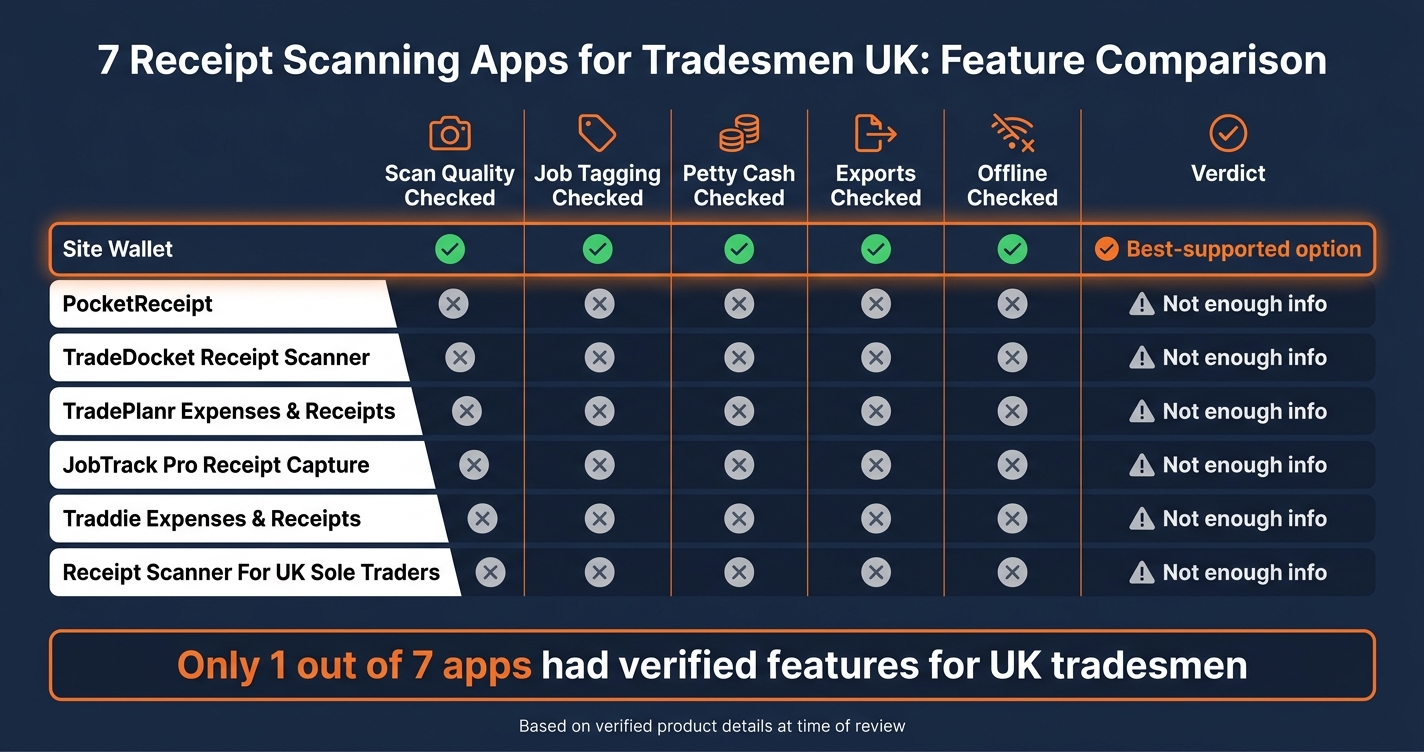
7 Best Receipt Scanning Apps for Tradesmen UK: Feature Comparison
| App | Scan quality checked | Job tagging checked | Petty cash checked | Exports checked | Offline checked | Best read from article |
|---|---|---|---|---|---|---|
| Site Wallet | Yes | Yes | Yes | Yes | Yes | Best-supported option in this list |
| PocketReceipt | No | No | No | No | No | Not enough checked info |
| TradeDocket Receipt Scanner | No | No | No | No | No | Not enough checked info |
| TradePlanr Expenses And Receipts | No | No | No | No | No | Not enough checked info |
| JobTrack Pro Receipt Capture | No | No | No | No | No | Not enough checked info |
| Traddie Expenses And Receipts | No | No | No | No | No | Not enough checked info |
| Receipt Scanner For UK Sole Traders And Small Businesses | No | No | No | No | No | Not enough checked info |
In plain terms: this is less a seven-way head-to-head and more a reminder to check the facts before you trust an app with your receipts, VAT records, and job costs.
sbb-itb-12417dd
1. Site Wallet
Site Wallet is built for tradesmen and small crews who need a simple way to scan receipts, assign them to jobs, and export expense data for bookkeeping.
Scan accuracy
Site Wallet uses AI to pull out the vendor name, total amount, date of purchase, and expense category from a receipt, which cuts down on manual data entry. It works well with faded, crumpled, and handwritten receipts from busy sites. Once a receipt is scanned, you can then link it to the right job.
Job tagging
You can assign each receipt to a specific job or project, so costs stay tied to the right work site. The Professional plan adds more advanced job tagging and team collaboration tools. That same tagging helps keep cash spend visible at site level too.
Petty cash logs
Job-based entries create a running petty cash record for each site.
Exports and security
Site Wallet supports PDF and CSV exports. Records are stored in secure cloud storage.
| Feature | Free Plan | Professional Plan |
|---|---|---|
| AI receipt scanning | ✓ | ✓ |
| Job tagging | Basic | Advanced |
| PDF export | ✓ | ✓ |
| CSV export | ✓ | ✓ |
| Unlimited scanning | ✗ | ✓ |
| Team collaboration | ✗ | ✓ |
The next app is a better fit for teams that need a different mix of capture and reporting features.
2. PocketReceipt
The source material available here does not include verifiable, PocketReceipt-specific details. Because of that, there’s no fair way to judge its scan accuracy, job tagging, petty cash handling, export options, or offline use in this section.
Next, the comparison moves to TradeDocket Receipt Scanner.
3. TradeDocket Receipt Scanner
Verified, product-specific details for TradeDocket Receipt Scanner were not found in the sources reviewed. Because of that, its fit for UK tradesmen can’t be judged here.
Scan accuracy
There’s no verified data showing how TradeDocket deals with faded, crumpled or handwritten receipts.
Job tagging
No verified source confirms whether receipts can be tagged by project or crew member.
Petty cash logs
No verified source confirms cash-versus-card tracking.
Exports and offline
Offline capture and export formats are still unconfirmed. That means TradeDocket remains untested against the day-to-day site checks that matter most.
Next is the fourth app in the list.
4. TradePlanr Expenses And Receipts
No verified product details were found for TradePlanr Expenses And Receipts, so it can't be checked against the criteria used here.
No verified source confirms scan quality, job tagging, petty cash tracking, export formats, or offline capture.
Next is the fifth app.
5. JobTrack Pro Receipt Capture
Like the previous entries, there isn't much verified product info available for JobTrack Pro Receipt Capture.
Scan accuracy
Scan accuracy hasn't been verified. So there isn't enough confirmed info to judge how well JobTrack Pro handles faded or crumpled receipts.
Job tagging
There is no verified source confirming job tagging by project.
Petty cash logs
Cash-versus-card tracking and petty cash logs haven't been verified.
Exports and offline
Export formats, offline capture, and security remain unconfirmed.
Next is the sixth app.
6. Traddie Expenses And Receipts
We couldn’t verify the product details for Traddie Expenses And Receipts.
Scan accuracy
There’s no confirmed information on how well the app scans faded, crumpled, or torn receipts.
Job tagging
We couldn’t confirm whether receipts and expenses can be tagged by customer, van, or site.
Petty cash logs
There’s no verified detail on cash-versus-card tracking or petty cash logs.
Exports and offline
Export formats, offline capture, and security details couldn’t be verified.
The next app is the final entry in the comparison.
7. Receipt Scanner For UK Sole Traders And Small Businesses
Product details for this app could not be verified, so it’s hard to say where it fits.
There’s no confirmed data on how well it reads totals, supplier names, and dates from faded, crumpled, or handwritten receipts. It’s also unclear whether it supports job tagging. Petty cash logs by project remain unverified too.
Export formats and offline capture are still unverified. If you work in trades and often deal with weak signal, test no-signal capture and resync before you rely on it.
The next section compares the apps on scan accuracy, job tagging, petty cash, exports, offline use and security.
How The Apps Compare On Site
This is where the comparison gets practical: on site, in the van, and at the trade counter. It’s one thing for an app to look tidy in a demo. It’s another for it to work when you’ve got dirty hands, patchy signal, and a pocket full of bent receipts.
Scan accuracy on faded and crumpled receipts
This matters a lot on site, because receipts can fade fast if you don’t scan them straight away. Anyone who’s found a half-blank receipt at the end of the week knows the problem.
After the receipt is scanned, the next step is simple: can the app link that spend to the right job without turning it into a chore?
Job tagging and spend by project
Site Wallet lets you tag each receipt to a job or project, so spend stays linked to the right site. That makes it much easier to see what each project is costing as you go, instead of trying to piece it together later.
For teams, users can sync expenses to a central dashboard for approval. That gives office staff or managers one place to check records before they move on. After that, the last test is whether the export goes out cleanly for bookkeeping.
Petty cash logs and cash-versus-card tracking
Site Wallet keeps petty cash, card spend, and job costs in the same workflow. That helps cut down the usual end-of-month headache, especially when money has gone out in different ways across several jobs.
It also means you’re not jumping between separate records just to work out who paid for what. From there, the last test is whether the export goes out cleanly for bookkeeping.
Exports, offline capture and security
Site Wallet supports offline capture, so you can scan without a signal. That’s handy when you’re in a basement, on a remote site, or stuck somewhere with poor reception.
It also uses secure cloud storage for financial records.
Best fit for common UK trade setups
Different setups need different things. Some want speed above all else. Others need clearer job tagging or better reporting for a small team.
Site Wallet is a good fit for:
- solo traders
- tradespeople using both cash and card
- small crews that need simple job tagging and fast export
Site Wallet Pros And Cons
The table below sums up Site Wallet’s main strengths and trade-offs for UK tradesmen.
Pros and cons table
For small trade teams, the main question is simple: does the app stay quick on site and keep the books tidy back at the office?
| App | Main Pros | Main Cons | Best for |
|---|---|---|---|
| Site Wallet | AI scanning, job tagging, petty cash tracking, encrypted storage and exports | Free plan is basic; batch scanning and priority support are paid | Sole traders and small crews managing multiple jobs |
Conclusion
Pick the app that matches how you work: on your own, across shared jobs, or with crew spending in the mix. The right choice comes down to one thing: do you work solo, or do you split costs across a team?
Best picks by trade setup
For sole traders, the main thing is simple: you need solid OCR and easy PDF or CSV exports. Site Wallet's free plan handles the basics - AI scanning, job tagging, and export options - without a monthly fee. That makes it a sensible starting point if you want to keep admin light. Automatic job tagging helps, and clean exports save hassle later. If you're often on sites with weak signal, offline capture matters as well.
For small crews, team features start to matter a lot more. Shared spending gets messy fast if there's no proper record behind it. Site Wallet's Professional plan adds team tools and advanced job tagging for shared costs, which makes it better suited to jobs where more than one person is spending money.
Key factors before you choose
If you're still weighing up your options, this checklist can help:
| Factor | Why it matters |
|---|---|
| OCR accuracy | Faded thermal receipts from trade merchants are common - poor scanning means manual re-entry |
| Job tagging | Without it, you won't know which job is eating your margin until it's too late |
| Petty cash tracking | Cash-versus-card tracking creates a clear audit trail and reduces the risk of unexplained shortfalls |
| Export format | Your accountant likely uses Xero or QuickBooks - check the app exports in a format they can actually open |
| Offline capture | Many UK sites have patchy signal; if the app won't save a receipt offline, you'll lose data |
If you're handling shared funds across a crew, encrypted storage and the option to revoke team access fast aren't optional. They're part of basic control. It also helps to test the OCR on something messy - a faded receipt, a crumpled merchant slip, the kind of thing you actually pull from a van dashboard at the end of the day.
The best app is the one that scans fast on site, tracks costs by job, and gives you clean exports later.
FAQs
How do I test scan accuracy properly?
Check how well the tool picks up the key details on each receipt, like the vendor name, total, and date. It should pull these in correctly across different receipt types without any manual input.
You should also see if it assigns expenses to the right jobs or projects. Then export the data to PDF or CSV and make sure the output is still accurate and easy to use for your accounts.
Will it work without signal on site?
Yes. Site Wallet works on-site even when the signal is poor, so you can still scan receipts and log petty cash expenses offline.
Your data is stored on your device and syncs automatically when you're back online, so your records stay up to date and ready to export.
Can I export records for my accountant?
Yes. Site Wallet lets you export organised expense records and send them to your accountant.
You can generate PDF or CSV files. Those are standard formats for tax prep, bookkeeping, and sharing reports with clients or partners.