
If I track mileage by day instead of by job, I can miss job costs, underprice work, and make tax records harder than they need to be. The fix is simple: I log each business trip when it happens, link it to the right job, keep private use separate, and review totals each month.
Here’s the article in one view:
- Tag each trip to a job so I can turn miles into a £ cost
- Keep one log per van and record private trips outside the business log
- Record HMRC basics: date, destination, purpose, and miles
- Use HMRC mileage rates for cars and vans: 45p per mile for the first 10,000 miles in a tax year, then 25p
- Keep records for at least 5 years after the 31 January filing deadline
- Match receipts like parking, tolls, and fuel to the same job tag
- Review monthly totals to spot jobs where travel is eating margin
A plain rule works best: if the trip is for business, I log it that day and attach it to the job. That gives me cleaner pricing, better month-end checks, and year-end records that are easier to hand to my accountant.
| Area | What I do | Why it helps |
|---|---|---|
| Job costing | Tag every trip to a job | Shows the travel cost of each job |
| Tax records | Record date, purpose, destination, miles | Supports HMRC claims |
| Vehicle control | Keep a separate log for each van | Stops records getting mixed up |
| Private use | Leave private and normal commuting out | Keeps business mileage clean |
| Extra travel spend | Tag parking, tolls, and fuel receipts to the same job | Shows total travel spend, not just miles |
| Reviews | Check totals monthly and at year end | Helps spot margin drift and mileage limits |
So the main point is straightforward: job-tagged mileage gives me better cash flow visibility and cleaner tax records without adding much admin.
What HMRC expects from mileage records in the UK
HMRC Mileage Rates: Simplified vs Actual Vehicle Costs Explained
Once you’ve tagged mileage to a job, there’s one more step: the record needs to line up with HMRC rules.
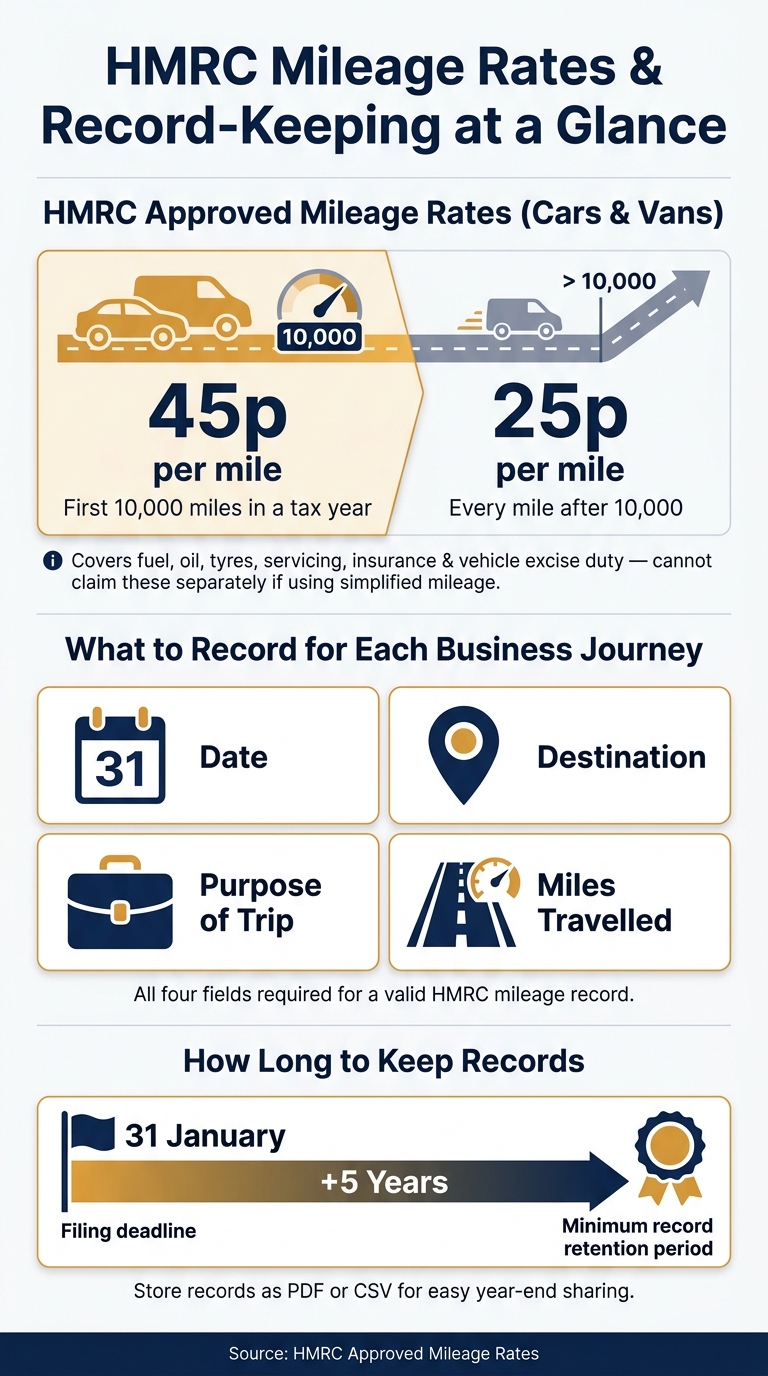
HMRC expects mileage logs to clearly show the date, destination, purpose and miles travelled for each business journey. That might sound basic, but it matters. Good records support your tax claims and help you keep a close eye on job margins.
What to record for each business journey
For each business journey, record:
- the date
- the destination
- the purpose of the trip
- the miles travelled
If any of those details are missing, the record starts to look shaky.
Business travel vs ordinary commuting
Travel to a temporary job site counts as business mileage.
Commuting to a permanent workplace does not. Private trips should also stay out of the business mileage log. A simple rule of thumb: if the journey is personal or part of your normal commute, don’t put it through the business.
Simplified mileage rates and when they apply
For sole traders and partnerships, HMRC’s approved mileage rates let you claim a flat rate per mile instead of working out actual vehicle costs.
The current rate for cars and vans is:
- 45p per mile for the first 10,000 miles in a tax year
- 25p per mile after that
These rates cover fuel, oil, tyres, servicing, insurance and vehicle excise duty. So if you use simplified mileage, you can’t claim those costs separately.
How long to keep mileage records
Keep Self Assessment mileage records for at least five years after the 31 January filing deadline. That way, the records are there when your accountant asks for them.
It also helps to keep records in PDF or CSV format. They’re much easier to find, check and share at year-end.
sbb-itb-12417dd
How to track mileage by job, van, and crew
Use one simple rule: log every business journey to the right job on the day it happens. Do that, and each trip shows up in both your job costs and your tax records. No digging through notes later. No trying to remember where that supplier run belonged.
Tag every journey and travel cost to a job
Tag every business journey - depot to site, supplier stop, or site-to-site travel - with a job code. Then use that same code for mileage, fuel, parking, and tolls. It keeps the paperwork tied together, which makes monthly checks much less of a headache.
Scan receipts as soon as you get them. If you leave it until later, that's usually when bits go missing and the back-office tidy-up turns into a slog.
Keep the same approach across every vehicle.
Keep a separate log for each van and split private use
Give each van its own mileage log, and record private journeys separately. That makes the numbers easier to read when you review mileage for tax and job costing.
It also helps if more than one vehicle is out on different jobs during the week. Each van has its own trail, so you're not mixing one vehicle's mileage with another.
Record crew travel the same way every time
When a crew travels in one van, the driver logs the start and end mileage once and tags the trip to the job code. If there's a fuel, parking, or toll receipt, photograph it and tag it to the same job straight away.
Use that same process for every crew trip. One routine, every time. That's how you avoid missed mileage, stray receipts, and patchy records.
Build a daily routine on site
Log every journey on the day it happens to avoid missed miles and lost receipts. When you arrive on site or when you leave, record the journey, tag it to the job, and attach any travel receipts at the same time.
Done this way, the figures are ready for monthly review and year-end reporting. Those tagged journeys then feed straight into job costing and year-end reporting.
Turning mileage records into job costing and year-end reporting
Tagged logs can do more than track journeys. They turn mileage into job-cost data and year-end records, using the same tags to move from daily logs to monthly costs and annual figures.
Convert miles into a £ travel cost for each job
If you use simplified mileage, multiply the business miles by HMRC's rate and you have a direct £ travel cost to assign to each job. Take that away from the job's revenue and you get a clearer view of margin after travel.
This matters most on jobs with long material runs, multi-site visits, or travel across a broad area. On paper, a job can look fine. Then the travel goes in, and the margin starts to look a lot thinner than expected at quote stage.
Review mileage totals monthly and annually
Once jobs are tagged, pull a mileage total per vehicle and per job at the end of each month. If your logs are already tagged, it's much easier to spot problems early, before a travel-heavy job has quietly eaten into margins for weeks.
Monthly totals also give you a running count of annual mileage. That helps you see when a vehicle is getting close to the 10,000-mile higher-rate threshold.
By year end, those monthly summaries are ready for your accountant.
Use past job records to price future work more accurately
Completed job records can make future pricing far more grounded. If you tracked mileage on a repeat-visit job or a call-out spread across several sites, you already have a real travel figure for the next similar quote, not just a rough estimate.
This is especially handy for:
- Call-outs
- Repeat visits
- Work outside your usual area
Over time, your records show which job types keep building up more travel than expected. That gives you a better basis for pricing, instead of letting the extra cost chip away at profit.
Simplified mileage vs actual vehicle costs: a comparison
Simplified mileage keeps job costing simple. Actual vehicle costs are often a better fit for larger fleets, but they come with more record-keeping.
Using Site Wallet to keep job-tagged travel spending organised
Mileage covers the journey. Receipts deal with the smaller travel costs around it.
Fuel, parking and tolls all add extra costs to a job, and those little bits can pile up fast. Use Site Wallet to tag those receipts to the same job as the mileage entry, so everything sits under one label instead of being scattered across your records.
Match receipts and petty cash to the same job tags as mileage
Scan receipts straight after purchase. Do it while the details are still fresh and before the slip disappears into a pocket, van door or glove box.
Scanned receipts capture the vendor, amount, date and category automatically. Then tag the receipt to the same job as the mileage entry. That gives you a clearer picture of the total travel cost for each job, not just the miles on their own.
Using the same job tags across mileage logs and travel spending keeps both records in step at year end. It also makes month-end checks much easier, because your mileage log and spend trail sit under the same job tag.
Export cleaner records for year-end and accountant review
Once travel receipts are tagged and stored digitally, they can be exported as a job-tagged PDF or CSV export when needed. That gives your accountant a cleaner set of job-tagged records for year-end, instead of a paper trail stuffed in folders, pockets or the cab of the van.
Keep mileage in your mileage log; use Site Wallet for receipts and petty cash.
Conclusion: A simple system that protects margins and supports tax records
Job-tagged mileage shows the actual travel cost of each job. It also gives you a clean audit trail at year-end, which makes tax records far less of a headache.
The best part? This doesn't need to be complicated. Log each journey against the right job as it happens, keep each van on its own record, and turn miles into a £ cost you can use for pricing and tax.
It also helps to tag fuel, parking, and tolls to the same job as the mileage entry. That way, your total travel cost sits under one label, and year-end checks are much easier to work through.
Keep these habits in place throughout the year:
| Habit | Why it matters |
|---|---|
| Record journeys at the time of travel | Prevents memory gaps and keeps figures accurate |
| Use the same job tags across mileage and receipts | Keeps all travel costs under one label per job |
| Keep a separate log per van | Separates private use and simplifies vehicle records |
| Review mileage totals monthly | Catches errors before they carry into the next period |
| Store digital copies of related receipts | Reduces year-end admin and helps keep the audit trail intact |
A simple daily log-and-tag routine keeps records clean without piling on extra admin.
FAQs
How do I handle mixed business and private van use?
Keep business and personal van costs separate. It makes your tax records cleaner and cuts down on problems later.
Only tag genuine business costs to the right jobs, such as:
- fuel for site visits
- equipment transport
If a cost relates to private use, leave it out of your business records.
It also helps to scan and categorise receipts when you pay. That gives you a clear audit trail and makes year-end reporting much easier.
What counts as a temporary workplace for mileage?
For mileage, a temporary workplace is somewhere you travel to for a short period to do your job, where that work isn’t expected to become permanent.
In plain English, that usually means travel to specific jobs or sites, not to your usual workplace or an ongoing fixed base.
Should I use simplified mileage or actual vehicle costs?
It depends on your admin preferences and tax requirements. Simplified mileage uses a flat, government-approved rate per mile, so it’s easier to manage and needs fewer detailed records.
Actual vehicle costs mean tracking all motoring expenses and working out the business-use share. It’s more accurate, but it also means more record-keeping.