
If I scan receipts when I pay, my reports are more accurate, month-end is easier, and I’m less likely to miss costs or fall short on HMRC records.
Here’s the short version: paper receipts go missing, fade, or sit in a van until it’s too late. That leads to missed expenses, weak job costing, and time lost on manual entry. Receipt scanning fixes that by turning each slip into a digital record with the date, supplier, total and VAT pulled in straight away.
What this means for me in practice:
- Fewer missing costs in profit and loss reporting
- Better job margin tracking when each receipt is tagged to the right job
- Less typing and fewer entry mistakes
- Faster month-end work for me and my accountant
- Clearer HMRC records, which matters as digital record rules expand from April 2026
A few numbers make the point:
- Firms using paper systems can lose 10–15% of receipts each year
- Manual entry can bring an error rate of 15–20%
- HMRC fines for poor records can reach £3,000 per tax year
- OCR tools can read receipt data at around 95%+ accuracy in normal use
The core idea is simple: scan the receipt on the day, check the details, tag it to the job, and export the data when it’s time to do the books.
| Issue | Paper receipts | Scanned receipts |
|---|---|---|
| Record keeping | Easy to lose or fade | Stored digitally |
| Data entry | Typed by hand | Read from the image |
| Job costing | Often sorted later | Tagged at the time |
| Month-end | Slow and messy | Easier to pull together |
| HMRC checks | Harder to search | Searchable and clear |
So when I look at receipt scanning, I don’t see a fancy add-on. I see a simple way to keep petty cash, job costs and reporting in better order from the start.
How to Scan and Organize Receipts for Tax Season (Automatically Extract Key Details)
sbb-itb-12417dd
The reporting problems that receipt scanning solves
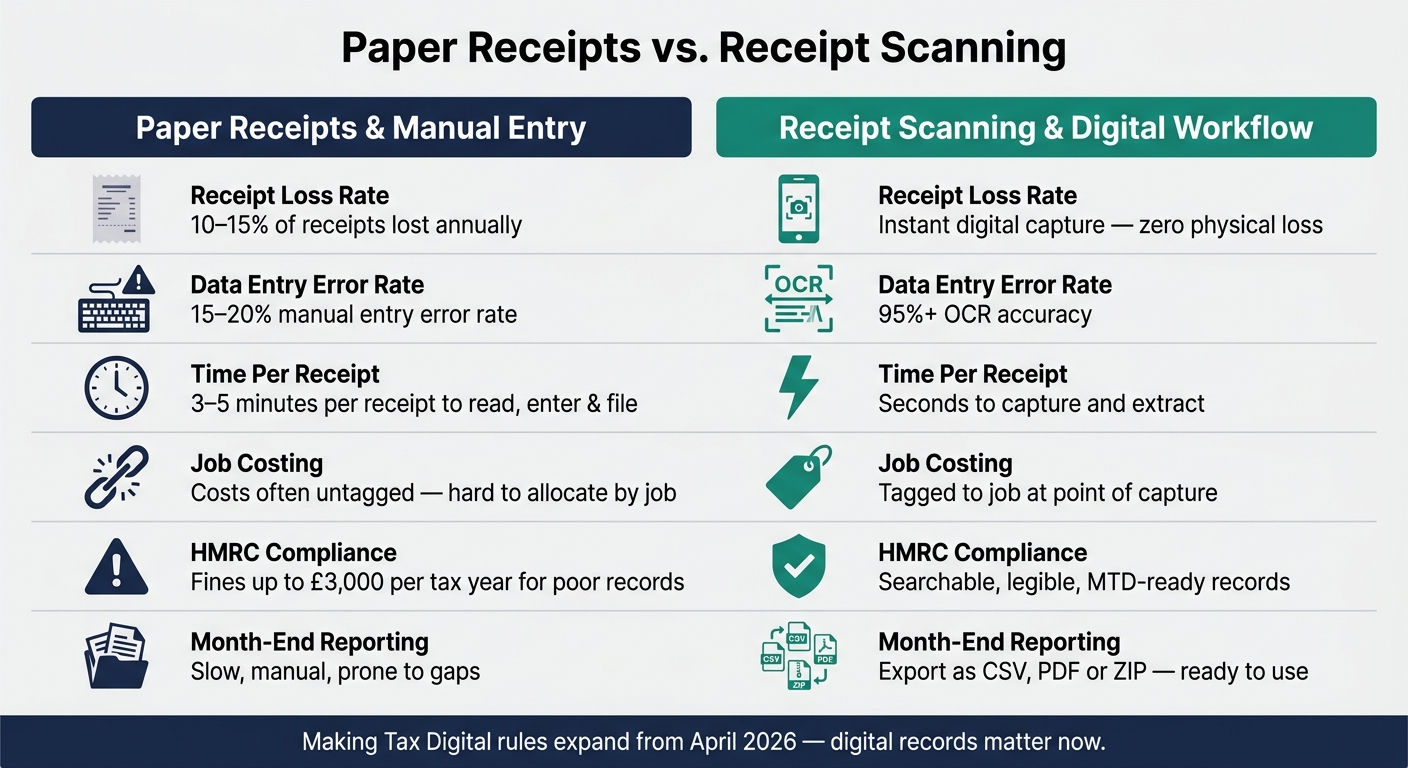
Paper Receipts vs Receipt Scanning: Key Stats & Workflow Comparison
Paper receipts get lost across vans, pockets and site offices
Trade work spreads receipts everywhere, and fast. One gets shoved into a van door pocket. Another lands in the glove box. A third disappears under a pile of delivery notes in the site office.
Then there’s the paper itself. Thermal receipts fade. They get stained, crumpled, or cooked by the heat in a glove box. By month-end, some are hard to read. Some are gone for good. Businesses using manual paper-based systems lose an average of 10–15% of their receipts annually, and those missing bits of paper leave holes in job costs and month-end reporting.
That leads to two knock-on issues: admin takes longer, and costs are harder to pin to the right job.
Manual data entry takes too long and introduces errors
Even when receipts make it back intact, someone still has to type them into a spreadsheet. That’s slow, fiddly work. Each receipt takes 3 to 5 minutes to read, enter and file. For a sole trader or small team juggling several jobs each week, that can eat up hours.
And time isn’t the only issue. Manual entry comes with an estimated error rate of 15–20% due to typos and misread amounts. A wrong date or total might not look like much on its own, but stack that across dozens of receipts and the reports start to drift.
Even if the figures are entered correctly, there’s still a catch: they’re no use for job reporting if they aren’t linked to the right work.
Untagged receipts make job margins harder to track
A receipt can be clear, entered properly, and still cause trouble if it isn’t tied to a specific job. Without that link, costs are hard to allocate properly, and job margins turn into guesswork.
You may know what you spent in total. That’s not the same as knowing which jobs made money and which ones quietly chipped away at it. Untagged receipts skew job margins and overheads, which sits at the heart of the reporting issue. Accurate job costing depends on tagging receipts at the point of capture, not trying to piece it together later from memory.
Scanning receipts as soon as you buy something sorts that out before the numbers go fuzzy.
How receipt scanning fits into day-to-day trade workflows
Mobile capture and OCR turn paper receipts into usable data
The fix is simple: capture the receipt before the details fade or go missing.
In practice, receipt scanning is easy. You open an app on your phone, take a photo of the receipt, and Optical Character Recognition (OCR) pulls out the merchant, date, total and VAT. In plain terms, OCR lifts the key details for you.
Modern mobile OCR can hit accuracy rates of 95% or more in day-to-day use. That gives you data you can drop straight into reports. A paper slip becomes a record you can use at month-end, and the whole thing takes seconds rather than minutes.
Scanning on site keeps records captured on the day and tied to the job
Once the data is there, timing matters.
The best moment to scan a receipt is before it leaves your hand - at the counter, in the car park, or on site before you head to the next job. If you scan it at the point of purchase, the date and job are still clear in your mind.
The workflow is simple: take the photo, check the extracted amount and merchant name while the purchase is still fresh, then tag the receipt to the right job. Once you’ve checked it, the digital copy becomes the working record. That keeps the spend linked to the correct job before it lands in the books.
Job tags, categories and exports feed cleaner job-cost and month-end reports
After capture, tagging is what turns each receipt into reporting data you can actually use.
When receipts are tagged by job, category and date, they can be exported cleanly as CSV, PDF or ZIP files. That gives you, or your accountant, a clear structured record to work from. It cuts out month-end manual entry and the usual pile of sorting.
How receipt scanning improves key financial reports
Once receipts are tagged and exported, they go straight into the reports that owners and accountants rely on.
More accurate profit and loss figures and faster month-end reporting
Digital receipts help keep P&L figures up to date because costs are coded when the money is spent, not rebuilt at month-end. Materials, fuel, sundries and petty cash go into the right P&L lines as the month moves on, so there’s no last-minute scramble to track things down or stitch them back together.
That same live data gives you a better read on job costs and cash flow too.
Clearer job costs, cash flow visibility and HMRC-ready records
Job-tagged receipts show job costs and overspend as they happen, by job and by site. If you split shared purchases across the right job codes at capture, your margin calculations stay clean and your job-cost reports remain trustworthy.
Scanned receipts also stay legible, searchable and ready for HMRC checks.
Paper receipts and manual entry versus receipt scanning: a comparison
The gap stands out when you put both workflows side by side.
| Process Step | Paper Receipts & Manual Entry | Receipt Scanning & Digital Workflow |
|---|---|---|
| Receipt Capture | Paper slips are easy to lose or fade | Instant digital snapshot via a mobile app at the point of purchase |
| Data Entry | Manual typing of vendor, date and amount into spreadsheets | Automated extraction using OCR technology |
| Error Risk | High risk of typos, transpositions and missed claims | Lower risk of human error |
| Audit Trail | Harder to search and check when records sit in paper piles or scattered files | Scanned receipts stay legible, searchable and ready for HMRC checks |
| Job Costing Clarity | Hard to track which materials belong to which job after the fact | Immediate tagging to job codes for real-time margin tracking |
Using Site Wallet to improve petty cash reporting
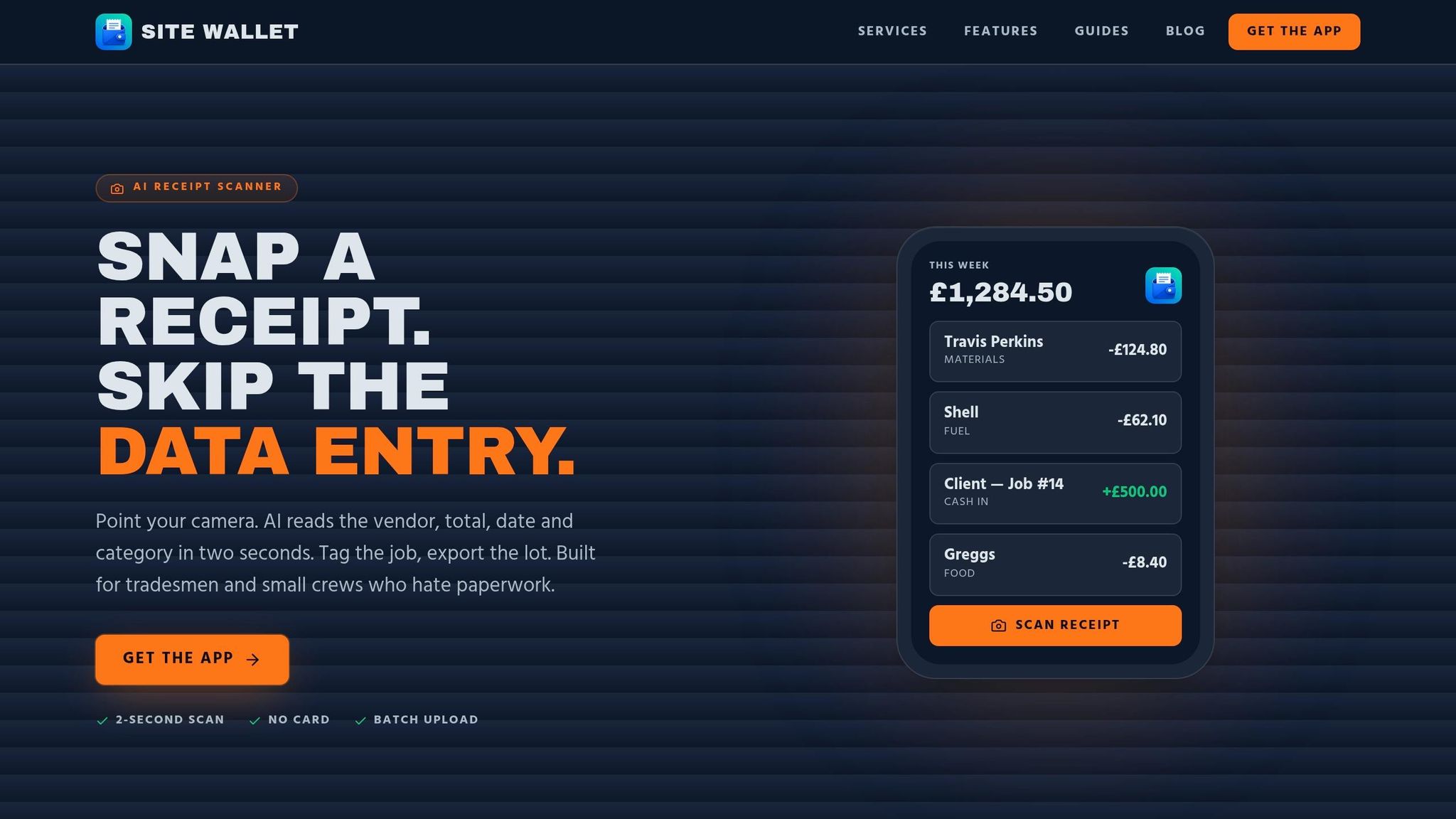
Receipt scanning, job tagging and cash flow tracking in one mobile workflow
For tradespeople handling petty cash, Site Wallet keeps receipt capture and job tagging in one mobile workflow. You can scan a receipt and tag the expense to the right job there and then. No scraps of paper in the van. No trying to remember later what that £18.40 was for.
That mobile-first setup helps keep petty cash records complete and job costs up to date. Every pound spent is logged, dated and linked to the right job, which makes cash flow tracking cleaner and internal reporting more dependable.
Exports that help owners and accountants prepare reports
Once a receipt is captured, the data is ready to use in reports. Site Wallet lets you export in PDF, CSV or ZIP format.
- PDFs help with accountant review
- CSV files can be imported into accounting software
- ZIP exports group receipts with the data for year-end checks
This cuts out retyping and saves time when reports need to be pulled together. Instead of working through a pile of faded paper slips, your accountant gets structured data that’s ready to use.
Conclusion: Receipt scanning cuts admin and strengthens reports
Missing or wrongly recorded receipts eat into margins, muddy cash flow and make month-end reporting harder than it needs to be. Receipt scanning tackles those issues head-on. Fewer receipts go missing, manual entry is reduced, job costs stay linked to the right jobs, and the records you pass to your accountant are complete and easy to read.
For UK trades businesses, digital records also help with Making Tax Digital compliance. The result is cleaner petty cash records, steadier job costing and faster month-end reporting. Site Wallet brings receipt capture, tagging and export into one workflow, so reporting is faster and cleaner.
FAQs
Do I need to keep paper receipts after scanning?
No. HMRC accepts digital copies for tax purposes, as long as the images are clear and easy to read, and you keep them for the required time.
Once you have a clear, checked digital record, you can safely get rid of the paper receipt. Store the digital files securely for at least five years after the 31 January Self Assessment deadline if you're a sole trader, or six years if you run a limited company.
How do I split one receipt across different jobs?
Use job or project codes when you scan the receipt. Then split the cost and assign each part to the right job, such as Job101, Job102, and Job103, instead of dumping the full receipt into one category.
That gives you a clearer view of where the money went. You can track costs with more precision and see profit on each job, rather than blending all spending together.
What if the scanned receipt details are wrong?
If the scanned receipt details are wrong, review and fix them straight away while everything is still fresh in your mind. Leave it until the end of the month, and even small mistakes can turn into a headache to sort out.
Check that the supplier name, total amount, date, and VAT details are correct and easy to read. For Site Wallet users, this helps keep financial reports accurate and records ready for HMRC.