
If I don’t tie labour to the right job each day, I can lose margin without seeing it until payroll or month-end.
Here’s the short version: I track each labour entry by job code, phase, and time type so I can see where hours, overtime, travel, and small site spend are going. That means I’m not just looking at one weekly wage total - I’m seeing what each job is costing as the work happens.
- I log time daily, not days later
- I split ordinary hours, overtime, and paid travel into separate lines
- I use the same job code for labour, mileage, and petty cash
- I check records weekly before payroll
- I keep phase detail such as first fix, second fix, decorating, and snagging
- I record employer costs too, such as NI, pension, and holiday pay
A small coding mistake can skew a job report fast. If one person books 8 hours to the wrong site, and that happens 3 times in a week, that’s 24 hours against the wrong job before payroll even runs. At £22.00 per hour, that’s £528.00 misplaced - and that’s before on-costs.
In plain terms, the process is simple: use one code system, record hours at the end of each shift, approve them each week, and keep expenses under the same job reference. That gives me cleaner job costing, firmer quoting, and fewer surprises.
The rest of the article explains how I keep that process tight without adding loads of admin.
TRACKING COSTS - Keeping track of job expenses!
sbb-itb-12417dd
What to record for every labour entry
Missing job codes or bundled hours create a mess later. Once you lock down those details, you can split time cleanly by type and phase.
Core details to include on timesheets and job logs
Every labour entry should include the same basic fields, whether you use paper sheets or a digital timesheet. Record the date in DD/MM/YYYY format, along with start time, finish time and unpaid breaks. Those details make it much easier to work out payable hours without any back-and-forth.
Use one job-code format across every log and timesheet. If one person writes JOB-045-MAN and another uses something else for the same site, someone ends up piecing it together later. With the right fields in place, you can cost labour straight from the timesheet.
| Entry Field | Purpose | Example |
|---|---|---|
| Worker name / trade | Identifies who did the work and their role | J. Patel / Plumber |
| Job code | Allocates the cost to the right project | JOB-045-MAN |
| Date | DD/MM/YYYY format for UK records | 06/09/2026 |
| Start / finish time | Raw data for total duration | 07:30 – 16:00 |
| Unpaid breaks | Deducted to find payable hours | 30 mins |
Log ordinary hours, overtime and travel time separately
Keep ordinary hours, overtime and paid travel time in separate fields. Ordinary hours sit at the standard rate, overtime uses the right premium, and paid travel time should appear on its own line.
This matters more than it might seem. If everything is rolled into one total, job reports become a guessing game. Separate entries show exactly what each part cost, so you don't have to work backwards from one blended figure. It also makes weekly checks and payroll sign-off much easier.
Use cost codes to break down labour by phase
Job codes link hours to the project. Cost codes link them to the phase. Use phase codes such as first fix, second fix, decorating and snagging.
When each labour entry includes the right phase, you can spot overruns while the job is still active, not weeks later when the money has already gone. It also gives you a clear breakdown of labour cost at each stage. Once every entry has a phase code, the next step is making sure records stay up to date day by day.
How often to log hours and approve records
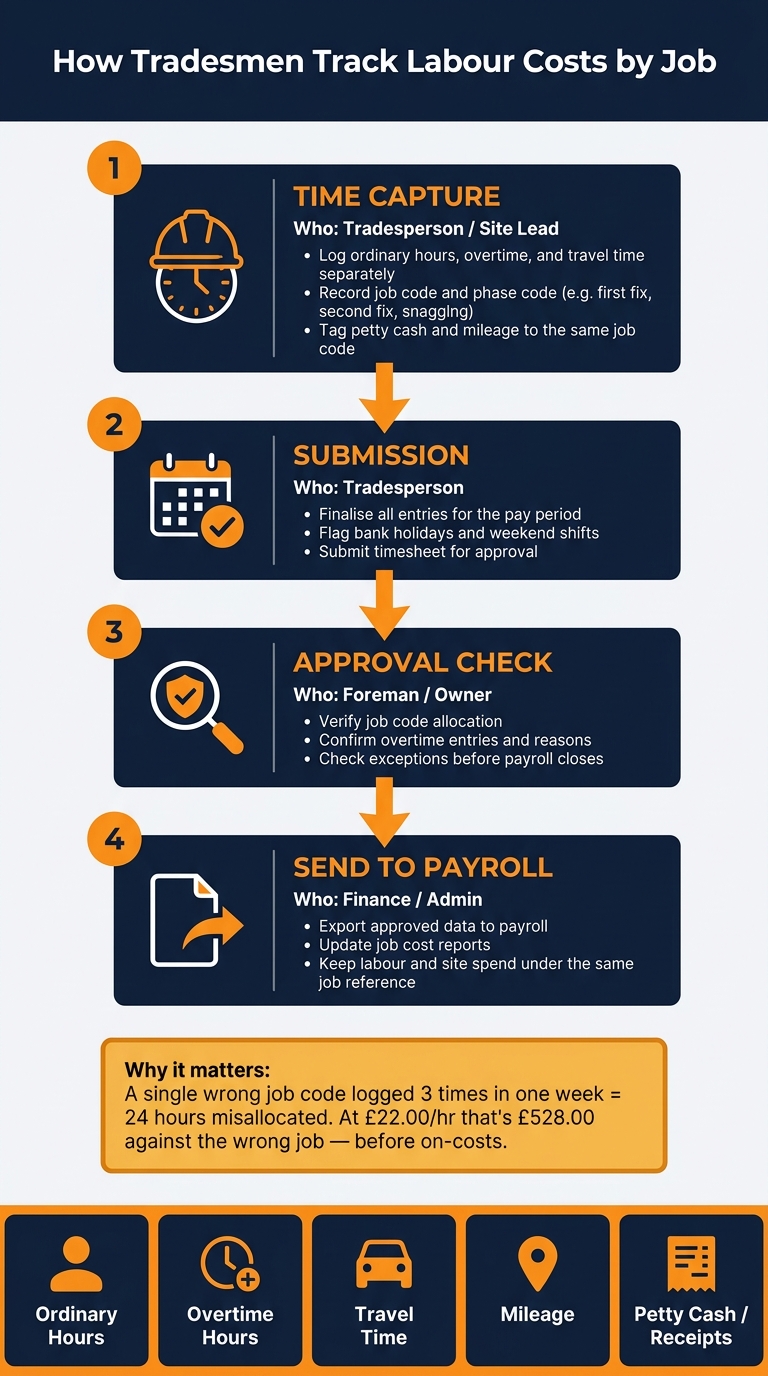
How Tradesmen Track Labour Costs by Job: The Daily-to-Payroll Process
When each labour entry is split by job and phase, the focus shifts. It’s no longer just about time spent on the tools. It’s about recording that time while it’s still clear. Once labour is tracked this way, timing is what separates an accurate record from a rough guess.
Log hours daily, not at the end of the week
If people wait a few days to record their time, the small details start to slip. Travel time gets missed. Job codes get guessed. Overtime can land on the wrong task. That’s why hours should be logged at the end of each shift, before anyone leaves site.
Record the day’s totals while the work is still fresh. That keeps job costs up to date and tied to what actually happened on site, not what someone thinks happened three days later.
That daily habit should then feed into a weekly check before payroll closes.
Run a weekly approval check before payroll
Run a weekly approval check before payroll. A simple four-step routine usually does the job:
| Step | When | Who | Purpose |
|---|---|---|---|
| Time capture | Daily (end of shift) | Tradesperson / site lead | Log hours, travel and phase codes |
| Submission | End of week (e.g. Friday) | Tradesperson | Finalise entries for the pay period |
| Approval check | Start of following week | Foreman / owner | Check job allocation, overtime and exceptions |
| Send to payroll | Weekly or fortnightly | Finance / admin | Send approved data into payroll and job cost reports |
This makes approval more about checking exceptions than fixing avoidable errors. Each job then carries its actual labour cost before payroll closes.
Align records with UK pay cycles and site conditions
Most UK trades work on weekly or fortnightly pay cycles, so the approval window is short. If a tradesperson submits on Friday and payroll runs on Monday, there’s not much time to sort out a wrong job code or a missed overtime entry.
Bank holidays and weekend shifts should be recorded separately. Flag them when the time is entered, so the weekly check can confirm them instead of having to dig around for them later.
Once that routine is in place, overtime and travel can be allocated cleanly, without guesswork.
How to handle overtime, travel and small site costs
Once labour is logged each day and approved each week, the next step is to stay on top of the extra costs that can quietly drag a job off target.
Charge overtime to the job and task that caused it
Overtime should go against the job and task that caused it, with a short note explaining why. That one small habit saves a lot of month-end tidy-up.
If those extra hours all end up under one general overtime line, the original quote can look better than it actually was. Worse, the task that caused the overrun gets buried. By logging overtime as its own entry against the right part of the job, you can see the true cost of each phase and keep future quotes closer to the mark.
The same thinking applies to travel and small site spend. If the cost belongs to the job, it should sit in the job record.
Record paid travel time and mileage consistently
Travel time is a labour cost. So log it as hours worked and allocate it to the job as labour.
Mileage is different. It should be recorded as a separate expense against the job.
To keep mileage records tidy, log:
- the date
- the journey
- the job code
- the agreed rate in £ per mile
That gives you a clear audit trail and makes it much easier to match travel costs back to the original estimate.
Tag petty cash and site expenses to the same job code as labour
Small site purchases like fuel, parking and consumables should be tagged to the same job code as the labour they support. That way, the full cost of the job stays in one place instead of being scattered across admin records.
It also helps to capture the receipt there and then. Take the photo at the point of purchase, tag it to the job, and move on. Simple.
| Cost Type | How to Record | Job Allocation |
|---|---|---|
| Ordinary hours | Daily timesheet entry | Job and phase code |
| Overtime hours | Separate entry with reason | Task and job that caused it |
| Travel time | Labour hours with journey times | Allocated to the job as labour |
| Mileage | Date, route, miles and £/mile rate | Separate expense on the job code |
| Petty cash | Receipt photo at point of purchase | Tagged to the same job code as the labour it supports |
Mobile tools cut the time needed to capture these costs.
Using mobile tools to cut manual admin
What mobile labour tracking should make easier
Once labour and expenses are linked to the right job code, mobile tools help keep that record straight on site. A good mobile tool should let teams log hours, job codes and phase codes there and then, so no one has to retype notes later. Supervisors should be able to approve entries in minutes, not spend Friday evening chasing bits of paper.
Where Site Wallet fits into job costing
Labour capture sits best in a time-tracking app. Petty cash and receipts need their own tidy home. Site Wallet handles the expense side: scan receipts, tag them to a job, and keep petty cash linked to the same code. Each expense is tagged to a job code, so site spend lines up with labour hours under the same reference. Approved records can be exported as PDF or CSV, which helps payroll and accounts work from clean data. That keeps labour and site spend under the same job reference.
Conclusion: the simple process that keeps job costs accurate
Use one job code across labour and expenses. Log daily, approve weekly, and export clean records when payroll or accounts need them.
FAQs
How detailed should my job codes be?
Job codes need enough detail to link labour hours and costs to the right site or project. That way, you can see how money is moving and check profit on each job instead of lumping everything together.
Use the same coding format across every entry. Consistent records are easier to sort, review and export, and they make tax reporting far less of a headache.
Who should approve timesheets each week?
Timesheets are usually best approved by a site or field manager. They’re close to the day-to-day work, so they can check hours as they happen and confirm the records are right before payroll runs or project cost reports are prepared.
A maker-checker process adds a simple layer of control. One person records the time, and another signs it off. That helps keep financial records accurate, protects project margins, and cuts down on manual reconciliation at month-end.
What should I do if hours are booked to the wrong job?
Fix the error as soon as possible so project cost tracking stays accurate. Find the original entry and change the job reference to the correct project.
If you use a mobile tool such as Site Wallet, you can tag hours and expenses to the right site as you record them. That helps keep records accurate and cuts down on discrepancies.