
If I wait until the last invoice to check profit, I’m too late. A job cost report shows, job by job, what I’ve budgeted, what I’ve spent, what I’ve committed to spend, and where margin is slipping while the work is still live.
Here’s the short version: I keep one report per site or client, use the same cost headings every time, log spend on the day, store receipts against the right job, and review the figures weekly. That covers labour, materials, plant or hire, subcontractors, petty cash, and travel in £ (GBP) with dates in DD/MM/YYYY format, such as 01/09/2026.
A few points matter most:
- One job = one profit check
- Same categories on every report
- Daily logging beats back-filling
- Mileage must be tracked in miles
- Missing receipts can mean missed claims
- Weekly reviews help spot overruns before they grow
I’d also keep these numbers in mind:
- HMRC’s mileage rate is 45p per mile for the first 10,000 business miles in a tax year
- Digital receipt records must be kept for at least 5 years
- Even small spends like parking, fixings, and van trips can chip away at margin if they are not logged
This piece is about keeping job costs simple, current, and tied to the right site so I can see profit clearly and price the next job with better numbers.
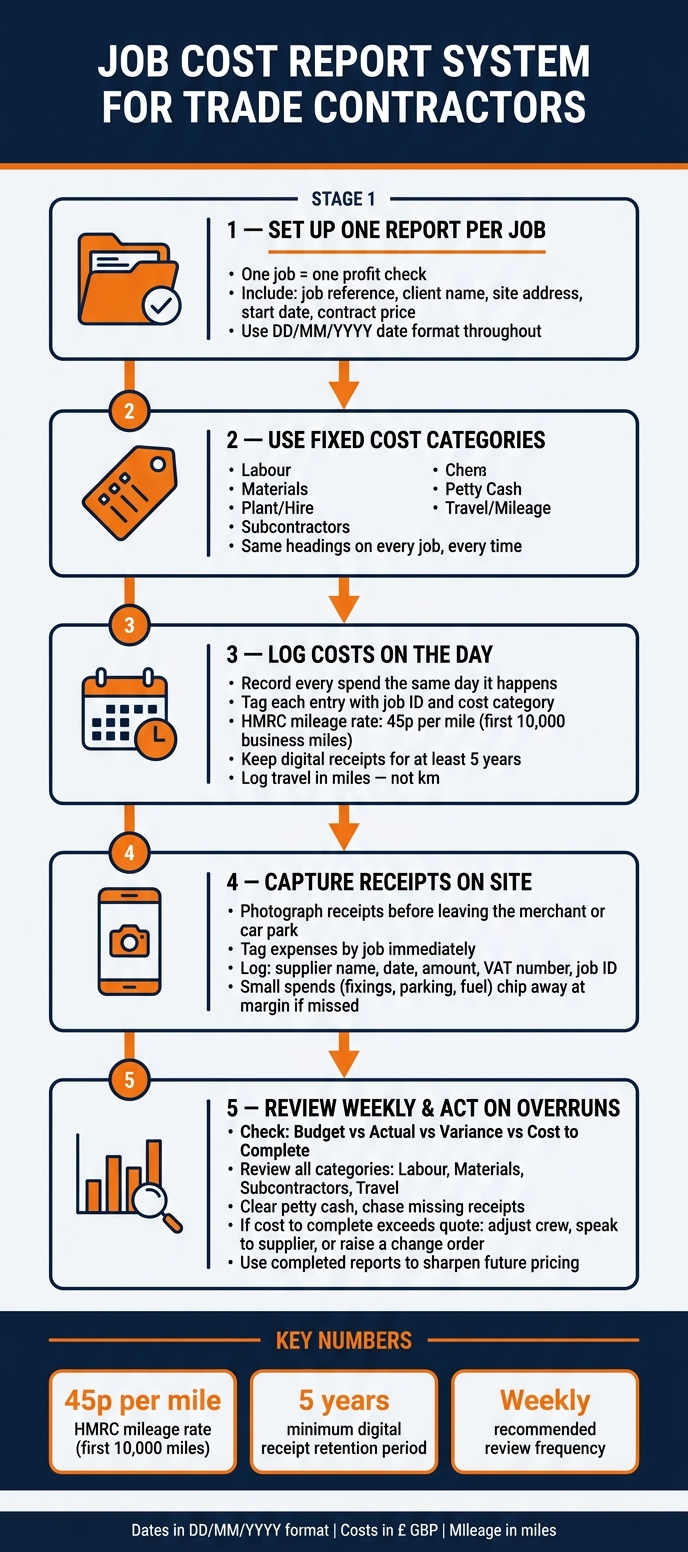
Job Cost Report System for Trade Contractors: Weekly Workflow
Job Cost Reports Every Construction Business Should Understand | Webinar
sbb-itb-12417dd
Set up one job cost report per site or client
Start each report with a clear job reference, client name, site address, start date, contract price, and opening budget. Put the date in DD/MM/YYYY format from the start. Once that top section is in place, send every daily cost into the same set of categories.
Use cost categories that match daily site spending
Your headings should mirror what you spend money on day to day on site. Keep the list short and fixed:
- Labour
- Materials
- Plant/Hire
- Subcontractors
- Petty Cash
- Travel/Mileage
Track subcontractors in their own category, and show CIS deductions clearly.
That list becomes the framework for every entry that follows.
Build a standard template in UK format
Once your categories are set, build one simple template and reuse it for every job. The core columns are below:
| Column | Purpose | UK Format Example |
|---|---|---|
| Cost Category | High-level heading | Materials |
| Description | Specific item or task | 100m 2.5mm Twin & Earth |
| Budget | Estimated cost at start | £1,250.00 |
| Actual to Date | Total spent so far | £1,100.00 |
| Committed Cost | Orders placed but not yet paid | £80.00 |
| Variance | The difference between Budget and (Actual + Committed) | £70.00 |
| Notes | Specific job site or supplier details | Purchased 01/09/2026 |
Use £ with two decimal places across the whole report, and record every date as DD/MM/YYYY. Log travel in miles so it lines up with HMRC's Approved Mileage Allowance Payment rates - 45p per mile for the first 10,000 business miles in a tax year.
Keep the layout the same on every job. That way, one report looks like the next, and it becomes much easier to track labour, purchases, travel claims, and receipts as they come in.
Record labour, materials, petty cash, travel, and receipts by job
Record costs on the same day. For every entry, use the job ID and the same cost categories from your report template.
Track labour and time against the correct job
For each day on site, record the worker's name, date, hours worked, job ID, task description, and total labour cost.
That means more than the basic wage. Log the full labour cost, including tax, insurance, and benefits on top of the base rate. Also include travel time to site, trips to collect materials from merchants, and return visits. Those bits often slip through the cracks, but they still belong in the job cost.
Use that same job ID for materials, petty cash, and travel too.
Log materials and petty cash purchases to the job on the day
When you pick up materials from a wholesaler or builder's merchant, record the supplier name, date, amount, job ID, and what the items are for that day. If it's a larger purchase, split it by line item so you can match it back to the estimate later.
Petty cash needs the same care. Every small cash spend should have a receipt attached. If there isn't a receipt, note the amount, date, purpose, and job code. HMRC accepts digital copies of receipts as valid evidence for at least five years, provided they clearly show the supplier name, date, amount, and VAT registration number where applicable.
Keep travel logs and receipt records in order
For every business journey, record:
- the date
- the starting point
- the destination
- the purpose
- the distance in miles
Add parking fees, tolls, and congestion charges as separate line items under the same job ID. Trying to piece journeys together later is risky and may be rejected by HMRC.
File receipts under the correct job and cost category as soon as they come in.
Once you're logging costs like this, mobile tools make it much easier to tag them while you're still on site.
Use mobile tools to sort costs by job while on site
Once each job has its own report, use your phone to log costs while you're still on site.
Capture receipts and tag expenses before they are forgotten
If you move between jobs during the day, paper receipts can disappear fast. One ends up in a van door pocket, another in your jeans, and one more never makes it back from the merchant.
So record each expense the moment it happens: photograph the receipt, enter the amount, pick the job, and save it.
This is where the small spends matter most. Fixings, parking, fuel, and minor materials don't look like much on their own, but they're often the first costs to slip through the cracks when you rely on memory.
Photograph the receipt before you leave the merchant or car park.
Use Site Wallet for petty cash and job-based expense records
Site Wallet helps tradesmen and small crews scan receipts, tag expenses by job, track petty cash, and export PDF or CSV reports for review.
At the end of the week, you can export the job's expense data and check actual costs against your original estimate. When every spend is tagged on site, the weekly review turns into a fast check of budget, actuals, variance, and cost to complete.
Review the report each week and act on cost overruns
Once costs are logged on site, review them every week. A weekly WIP review shows if the job is still on budget and what’s left to finish. Keep each job separate so overruns stand out fast, and so you can spot which jobs are eating into margin.
Check budget, actual, variance, and cost to complete
Review labour, materials, subcontractors, and travel against the budget. Then check the variance and the remaining cost to complete. When you review labour, use true labour cost so the report shows what the crew actually costs.
Use the same job categories and job IDs from the report to keep the review tidy. A simple table like this works well for the current job:
| Cost Category | Budget (£) | Actual to Date (£) | Variance (£) | Variance (%) | Action Notes |
|---|---|---|---|---|---|
| Direct Labour | |||||
| Materials | |||||
| Subcontractors | |||||
| Travel/Fuel | |||||
| Total |
Clear petty cash and chase missing receipts before they skew the weekly totals.
Once the variance is clear, update the remaining cost and act on any overrun. If the remaining work still fits within the quoted price, you may only need to tighten up one area. If the cost to complete is moving past your quote, act fast - adjust the crew schedule, speak to your supplier, or raise a change order if the scope has changed.
Use completed job reports to improve future pricing
Use each completed report to improve pricing on similar jobs. Over time, completed job reports give you a tighter pricing baseline and help protect your margin. Use those finished reports to tighten the next quote.
FAQs
What should I include in a job cost report?
Include every cost under the right job code, such as:
- materials and supplies
- labour, subcontractors, and equipment hire
- permits, inspections, disposal fees, and job-specific insurance
Record travel costs too, including fuel, parking, and mileage. For each entry, note the date, location, and business purpose.
Keep every receipt and tag it to the right job. That makes your records accurate and helps keep them in line with HMRC rules.
How often should I update job costs?
Update job costs in real time, or as often as you can, during the project so your records stay accurate. Log and tag expenses like material receipts and labour hours every day. That simple habit helps stop costs from slipping through the cracks or being forgotten later.
Scan receipts as soon as they come in. Paper copies can fade or become unreadable on site, which turns a small admin task into a headache. On top of those daily updates, review your work-in-progress reports at least once a month.
How do committed costs affect profit?
Committed costs are future costs you've already agreed to, such as materials or labour. You may not have paid them yet, but they still eat into the budget left on a project. That also means your profit margin can look better on paper than it actually is.
If you don't track these costs properly against your original budget, it's easy to spend too much or price future work too low. Managing committed costs well keeps your profit forecast grounded in what's already spoken for.