

Petty Cash for Tradesmen: A Complete Guide
Managing petty cash effectively is essential for tradesmen to avoid financial leaks and ensure accurate job costing. Petty cash is a small fund, typically £50–£500, used for minor, on-the-spot expenses like screws, fuel, or parking. However, poor tracking can lead to unrecorded expenses, HMRC penalties, and distorted project budgets. Here's what you need to know:
- Set Up a System: Decide on a fund size (£50–£200 for most tradesmen), appoint one custodian, and store the cash securely in a locked box.
- Track Every Expense: Log each purchase with details like date, amount, supplier, job reference, and purpose. Always keep receipts.
- Set Limits: Cap single transactions at £20–£25 to prevent misuse.
- Reconcile Regularly: Weekly checks ensure the fund balances (cash + receipts = starting amount). Investigate any discrepancies immediately.
- Use Mobile Tools: Apps can scan receipts, tag expenses to jobs, and store records digitally, saving time and reducing admin errors.
Following these steps not only helps with compliance (records must be kept for six years) but also keeps your finances organised and your projects profitable.
Petty Cash Explained | Accounting How To | How to Pass Accounting Class
sbb-itb-12417dd
Setting Up a Petty Cash System
To establish a petty cash system, start by deciding on the fund size, appointing a custodian, and ensuring secure storage. It's important to tailor the fund size to your specific operational needs.
Choosing the Right Fund Size
For most tradesmen, a starting float of £50 to £200 is usually sufficient to cover daily expenses while keeping cash risks low. The exact amount will depend on how often small purchases are made and how many people need access to the fund. A sole trader who occasionally buys supplies will require a much smaller fund than a team managing multiple sites.
"The key principle is to keep it small enough that losing it would not be a serious problem, but large enough that you do not have to top it up constantly." - Business Accounting Basics
It's also a good idea to set a maximum spend per transaction, typically in the range of £20 to £25, to prevent the fund from being drained by larger expenses that should go through formal channels. Start with a conservative limit and adjust it based on how the system works in practice.
After determining the fund size, the next step is to assign a custodian to oversee the petty cash.
Appointing a Custodian and Defining Access
Select one individual to manage the petty cash fund. This custodian will be responsible for disbursing cash, collecting receipts, maintaining a log of transactions, reconciling the fund, and requesting top-ups when needed. For added security, require an additional signature for larger withdrawals.
"Only one person should manage the petty cash fund. This custodian handles disbursements, collects receipts, maintains the log, reconciles the fund regularly, and requests replenishments." - Gracie Sinclair, Amplify11
It's also helpful to create a brief written policy. This should outline who is allowed to request funds, what the money can be used for, and what steps to take if a receipt is lost.
Keeping Cash Secure and Separate
The petty cash fund should be stored in a locked tin or cash box, placed in a secure location such as a locked drawer or cabinet. The custodian should be the only person with access to the key.
Make sure petty cash is kept entirely separate from personal or other business funds. The money should come directly from your business bank account and be recorded separately in your financial records. This separation is crucial for accurate tracking of expenses related to specific jobs or projects.
Common Uses of Petty Cash in Trade Work
Once your petty cash system is in place, it’s time to define its role on a tradesman’s site. The fund is meant for immediate, low-cost purchases that pop up during the workday - not for regular procurement or items that should go through formal ordering processes.
Examples of Job-Related Expenses
Petty cash often covers a variety of practical, day-to-day needs. These include consumables like nails, screws, cement bags, or drill bits; site essentials such as tea, coffee, or cleaning supplies; and travel-related costs like parking fees, fuel top-ups, or tolls. It may also be used for small tool replacements, urgent equipment repairs, or basic administrative items like stamps or stationery. Below is a breakdown of common expense categories:
| Expense Category | Typical Trade Examples |
|---|---|
| Consumables | Nails, screws, cement bags, drill bits |
| Site Sundries | Tea, coffee, milk, bin bags, cleaning items |
| Travel & Transport | Parking, fuel, tolls, courier fees |
| Minor Tools | Small tool replacements, equipment fixes |
| Admin | Stamps, stationery, printer paper |
These examples show why it’s crucial to have strict spending rules and maintain detailed records.
Setting Spending Limits and Usage Rules
To manage these expenses effectively, clear spending limits are essential. Set a cap on transaction amounts, ensuring that anything exceeding this limit goes through formal processes like a bank transfer or company card. This approach safeguards the petty cash float and ensures job costs are accurately recorded.
"Job costing accuracy depends on expenses being captured and coded correctly at the time of purchase. A petty cash fund replenished in a lump sum forces the bookkeeper to reverse-engineer cost allocations after the fact." - Vergo
Every expense must be backed by a receipt and recorded with a voucher noting the date, amount, and reason for the purchase. As Chiral Accountants stress:
"Every single penny spent must have a receipt to back it up. No exceptions!"
It’s equally important to define what petty cash cannot be used for - such as large material orders, employee wages, or any expense requiring a formal purchase order. Clear rules from the beginning eliminate ambiguity and make tracking and reconciling the fund much simpler.
Tracking Petty Cash Expenses by Job
Once you've established spending limits and guidelines, keeping a detailed record of expenses for each job becomes essential. Without this, it's easy to lose track of where your money is going.
You need to match every expense to a specific job. Otherwise, petty cash can quickly become a mystery - perhaps you've spent £65 this week, but was it for the Smith kitchen or the Jones extension? This lack of clarity makes month-end reconciliation a nightmare, especially for tradesmen managing multiple sites.
"The biggest mistake CIS contractors make? Leaving record-keeping until they're back at home, exhausted, and can't remember which receipt belongs to which job." - Harrisons Accountants
Key Details to Record for Each Transaction
Every petty cash withdrawal should be logged with enough detail to make it clear what was spent, why, and for which job. Here's what you need to track:
| Detail | What to Record |
|---|---|
| Date | The purchase date |
| Amount | Total paid, including VAT |
| Supplier | Where the purchase was made (e.g., Screwfix, Travis Perkins) |
| Job Reference | The project name or site address (e.g., "Green St Extension") |
| Category | Type of expense (e.g., Materials, PPE, Fuel, Parking, Small Tools) |
| Purpose | A specific description (e.g., "copper pipe fittings – Smith kitchen") |
| Voucher No. | A unique reference number for your records |
| Receipt | Attach a physical or digital copy |
If you're working under the Construction Industry Scheme (CIS), pay special attention to separating labour and materials. CIS deductions only apply to labour costs, so unclear records could lead to overpaying tax or scrutiny from HMRC.
Additionally, HMRC requires limited companies to keep petty cash records and receipts for six years. Failure to comply could result in fines of up to £3,000.
Using a Daily Log to Stay Organised
A daily log is one of the simplest ways to keep your spending organised. Whether you use a notebook in your van or an app on your phone, the key is to record each transaction immediately after it happens.
| Date | Voucher No. | Job Reference / Description | Money Out (£) | Money In (£) | Balance (£) |
|---|---|---|---|---|---|
| 01/06/26 | - | Opening Balance | - | 150.00 | 150.00 |
| 02/06/26 | 001 | Smith Kitchen – Copper pipe fittings | 12.50 | - | 137.50 |
| 03/06/26 | 002 | High St. Site – Parking (client meet) | 4.00 | - | 133.50 |
| 04/06/26 | 003 | Jones Extension – 2x bags of cement | 18.00 | - | 115.50 |
| 05/06/26 | 004 | Van – Milk/tea | 3.20 | - | 112.30 |
This log will feed directly into your regular petty cash reconciliation, ensuring everything matches up. If you're managing multiple sites, it's best to keep separate sections for each project. Mixing funds across jobs can make reconciliation harder and distort your job costing figures.
"Your remaining cash plus your receipts should equal your starting fund amount." - Xero UK
Make it a habit to reconcile your log at least once a week. Spotting a missing receipt on Friday is far easier than trying to track it weeks later.
Using Mobile Tools to Manage Petty Cash
Keeping a daily log only works when updates happen on-site and in real time. For tradesmen, this means recording expenses as they occur, directly on a mobile device. Mobile tools close the gap between spending money and tracking it - a common weak spot in many petty cash systems. This hands-on approach naturally leads to the benefits of receipt scanning technology.
How Receipt Scanning Saves Time
Shoving receipts in your pocket or van and sorting them later often results in lost information. This is where AI-powered OCR (Optical Character Recognition) steps in. It instantly captures and saves key receipt details like the supplier name, date, total amount, and VAT. The best practice? Scan your receipt before leaving the shop. Once a receipt disappears into your jacket or toolbox, it’s unlikely to resurface. Using a mobile app to log a purchase takes less than 10 seconds. Over time, this can save business owners up to 15 hours of admin work each week. Plus, once scanned, receipts can be linked to specific jobs, making financial tracking much simpler.
Tagging Expenses by Job for Clearer Records
Scanning receipts is just the start - the real power lies in tagging each expense to its relevant job as you go. For instance, linking a purchase to "Green St Extension" or "Jones Bathroom" gives you a live snapshot of what every project truly costs. This is especially helpful for tradesmen working under CIS, as tagging ensures you correctly separate labour and materials, so deductions only apply to the labour portion.
"The records pay for themselves." - PocketReceipt Guide for Construction
Tradesmen using mobile expense tools with built-in spending controls have reported cutting their out-of-pocket expenses by up to 44%.
Storing and Exporting Records Digitally
Once scanned and tagged, receipts are securely stored in the cloud, creating a searchable audit trail that stays safe even if your device gets lost or damaged. This is crucial, as HMRC requires limited companies to keep petty cash records for six years. When it's time to share records with your accountant, tools that export data in CSV or PDF format can make the reconciliation process much smoother. A simple monthly export can save hours of hassle.
"My accountant used to dread my call. Now I just send her a Xero export every quarter." - Paul W., Builder
Even when you’re working in areas with no signal, offline logging ensures your records are captured and synced later.
Reconciling and Replenishing Petty Cash
Using your digital receipt records as a foundation, reconciliation ensures every transaction is accounted for. The goal is simple: the cash on hand plus the receipts should match the original petty cash fund.
How to Reconcile Petty Cash
The process revolves around the imprest system formula: physical cash remaining + total value of receipts = original fund amount. If the numbers don’t add up, you’ll need to investigate the discrepancy before moving forward.
"At any point, your remaining cash plus your receipts should equal your starting fund amount." - Lena Hanna, CPA, Xero UK
Conducting weekly reconciliations helps keep discrepancies manageable and easier to trace. When purchases are still fresh in everyone’s memory, it’s simpler to address any gaps. A quick daily log of your opening and closing balances can also help pinpoint when a discrepancy occurred.
Once everything balances, you can move on to replenishing the fund.
Topping Up the Fund
After reconciliation, replenish the fund by adding back the total value of verified receipts. For instance, if a £200 float drops to £158.71, you’d top it up by £41.29 to restore the original balance.
"When you replenish the fund, you add back exactly what was spent, returning the balance to its original amount." - Lena Hanna, CPA, Xero UK
A good rule of thumb is to top up when the fund drops to about 50% of its original amount. This ensures you don’t run out unexpectedly during a job. Once receipts are submitted and approved, stamp each one as "PAID" to avoid duplicate submissions.
Spotting and Fixing Discrepancies
Before finalising, review your records for any mismatches. Small discrepancies, like a missing receipt or an unrecorded purchase, can throw off the balance. The solution is to cross-check physical receipts against your log to identify any gaps.
| Discrepancy Type | Likely Cause | Solution |
|---|---|---|
| Shortage | Missing receipt or unrecorded spend | Compare the log with physical vouchers to locate the issue |
| Overage | Non-business cash mixed in (e.g., tea money) | Remove unrelated cash and match receipts to the log |
| Job misallocation | Incomplete receipt details | Add the job name or number to the voucher immediately |
If a discrepancy remains unresolved after thorough checking, record it in a "Cash Over/Short" account within your general ledger. However, recurring shortfalls signal a need to tighten controls or even reduce the fund size. As Billed advises:
"Finance should zero petty cash variances before locking the month, unresolved shortages compromise financial accuracy." - Billed
Keeping detailed, job-specific records throughout this process is critical. HMRC can impose fines of up to £3,000 for failing to maintain accurate accounts. Reconciliation isn’t just smart practice - it’s a safeguard for your business’s financial health.
Common Petty Cash Mistakes to Avoid
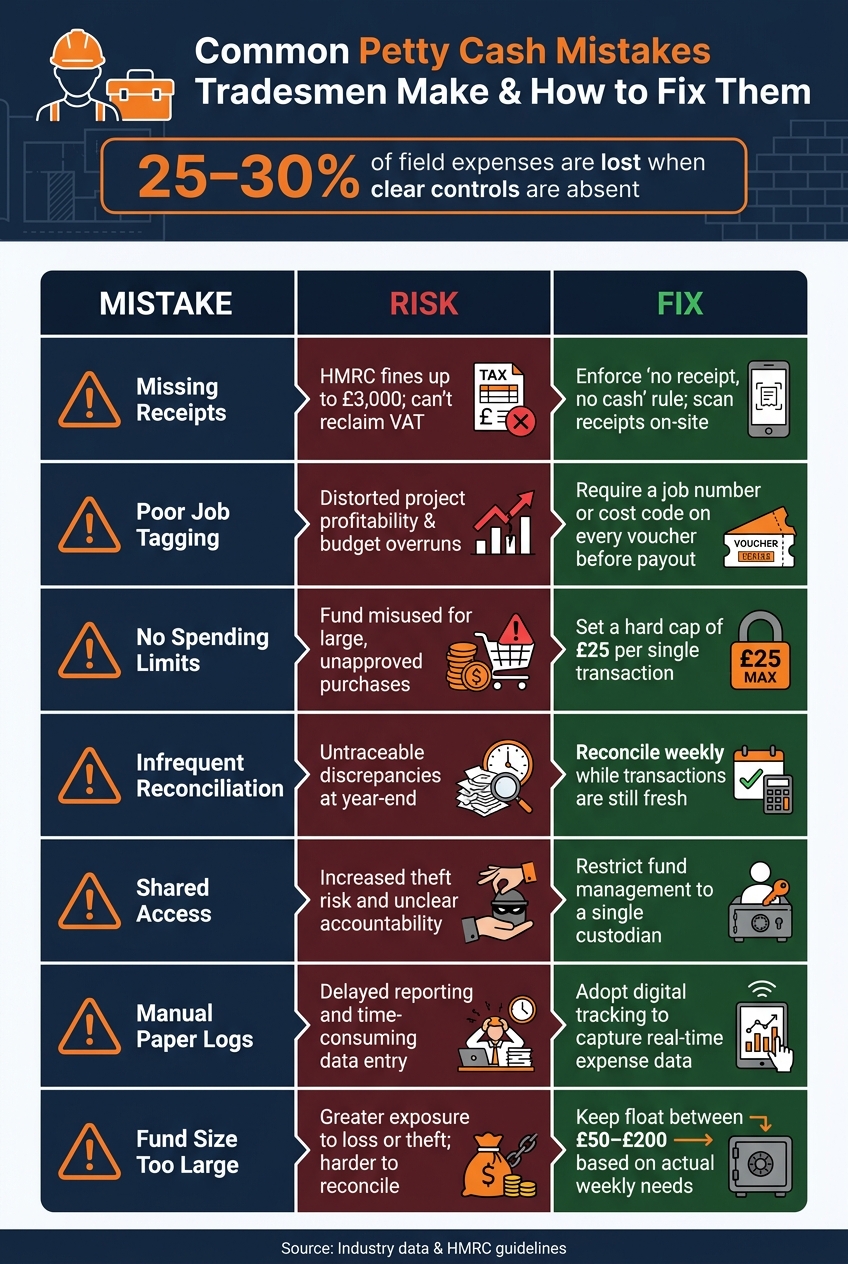
Common Petty Cash Mistakes Tradesmen Make (And How to Fix Them)
Even with strong reconciliation and tracking systems in place, petty cash management can still go awry if certain pitfalls are overlooked. The biggest issues often aren't dramatic instances of fraud but rather small, repeated errors that quietly add up over time. According to industry data, about 25–30% of field expenses are lost due to inflated bills, duplicate claims, or unverified spending when clear controls are absent.
One frequent problem is missing receipts. On busy worksites, paper receipts can easily get lost or damaged. A simple but effective solution is enforcing a strict "no receipt, no cash" policy, supported by mobile photo capture at the time of purchase. Another subtle yet damaging issue is poor job tagging. Without linking expenses to specific projects, it becomes difficult to assess whether a job was profitable. This can be resolved by requiring a job number or cost code on every voucher before any cash is issued.
"Petty cash tracking failures are one of the most common findings in construction audits." - Vergo
Below is a table summarising common petty cash mistakes, the risks they pose, and practical fixes:
Mistakes, Risks, and Fixes
| Mistake | Risk | Fix |
|---|---|---|
| Missing receipts | HMRC fines up to £3,000; inability to reclaim VAT | Enforce a "no receipt, no cash" rule; use mobile scanning on-site |
| Poor job tagging | Distorted project profitability and budget overruns | Require a job number or cost code on every voucher before payout |
| No spending limits | Fund misused for large, unapproved purchases | Set a hard cap – e.g., £25 – for any single transaction |
| Infrequent reconciliation | Untraceable discrepancies at year-end | Reconcile weekly while transactions are still fresh |
| Shared access | Increased theft risk and unclear accountability | Restrict fund management to a single custodian |
| Manual paper logs | Delayed reporting and time-consuming data entry | Adopt digital tracking to capture real-time expense data |
| Fund size too large | Greater exposure to loss or theft; harder to reconcile | Keep the float between £50 and £200 based on actual weekly needs |
How Site Wallet Helps Tradesmen Manage Petty Cash

Handling petty cash on a bustling worksite can feel like a constant battle. Receipts go missing, job expenses get confused, and by the time month-end rolls around, reconciling everything can eat up hours. Site Wallet is designed to tackle these headaches, offering tradesmen a streamlined way to manage on-site cash. Here's how its features make life easier.
Features Tailored for Tradesmen
Site Wallet brings together all the tools you need into one simple platform. Using AI-powered receipt scanning with OCR technology, it can instantly pull out details like vendor names, amounts, dates, and VAT from a quick photo snapped on-site. Each expense is tagged to a specific job or project in seconds, giving you real-time oversight of your costs.
The platform also keeps tabs on cash advances given to supervisors or workers, tracking settlements and outstanding balances in one place. And when it’s time to share records with your accountant or for self-assessment, you can export everything in formats like CSV, Excel, or PDF.
It’s not just about functionality, though. Site Wallet is designed to work seamlessly on your mobile device, ensuring ease of use wherever you are.
Quick and Simple Mobile Access
With its mobile-friendly design, Site Wallet lets you log purchases in under 10 seconds. Snap a photo, and the AI takes care of the rest - no more lost receipts stuffed into van pockets.
Smarter Financial Organisation for Tax and Bookkeeping
Site Wallet goes beyond basic expense tracking, automatically sorting your records into tax-ready categories. This means no more end-of-year panic digging through faded receipts. It also creates a digital audit trail, linking every transaction to its supporting documentation, meeting HMRC requirements.
For tradesmen under the Construction Industry Scheme (CIS), Site Wallet tracks deductions and material carve-outs, helping you avoid losing money on the labour-versus-materials split. Research shows that moving from manual cash handling to digital tracking can cut unexplained expenses by 30%. Plus, digital tools like this can reduce admin time by as much as 60%, giving you more time to focus on the job rather than the paperwork.
Conclusion: Key Takeaways for Petty Cash Management
Managing petty cash effectively is crucial for protecting your project budgets. While petty cash might seem insignificant, even small mistakes can gradually chip away at your profit margins on a job-by-job basis.
Establishing a solid system is the first step. Use the imprest system, maintain a fixed float, and assign responsibility to a single custodian. This keeps your petty cash fund balanced and makes reconciliation much easier. Accurate job-based tracking elevates cash handling into a valuable financial tool. When every purchase is properly logged against the correct job, your cost records remain precise, and your quoting improves over time. This approach simplifies financial management while ensuring accuracy.
As Vergo aptly stated:
"Petty cash tracking failures are one of the most common findings in construction audits. Physical cash has no inherent audit trail."
Modern, mobile-first solutions can take your cash management to the next level. Capturing receipts at the point of purchase, tagging them to specific jobs, and storing everything digitally means nothing gets misplaced in a toolbox or jacket pocket. This supports reliable record-keeping from start to finish.
Tools like Site Wallet combine these features into one platform, designed specifically for on-site use. Moving to a digital expense management system not only ensures compliance with statutory requirements but also gives tradesmen the tools to handle finances with greater precision and convenience.
FAQs
Do I really need petty cash, or should I use a card instead?
Petty cash works well for small, urgent, low-cost purchases where using a card or going through the usual procurement process might slow things down. Make sure to maintain detailed records and keep all receipts for proper reconciliation. For bigger or recurring expenses, managing multiple teams, or when a clear audit trail is needed, it's better to use cards or a formal reimbursement process. Petty cash should never be used for personal expenses or reimbursements, as this is strictly prohibited.
What should I do if I’ve lost a petty cash receipt?
If you’ve misplaced a petty cash receipt, you can create a petty cash voucher to document the expense. This voucher acts as formal proof for your records and helps maintain an accurate audit trail. It's also important to investigate the missing receipt right away to address any cash discrepancies.
To prevent this from happening again, make it a habit to collect receipts for every transaction. Receipts are crucial for maintaining accurate records and ensuring compliance with tax regulations.
How do I record petty cash correctly for CIS jobs?
To keep track of petty cash for CIS jobs correctly, make sure to log each transaction digitally as it occurs. A mobile app can be incredibly handy - use it to snap photos of receipts and assign expenses to the relevant projects. It's crucial to distinguish between labour costs (which are subject to CIS deductions) and material costs (which are not). Always include key details like the date, amount, business purpose, and category (e.g., materials or plant hire) to stay compliant and prevent paying more tax than necessary.