
If I don’t tag every material spend to a job on the day I buy it, my profit numbers are guesswork.
The fix is simple: I give each job its own code, log every receipt straight away, split shared stock using one rule, and check spend against the estimate every week. That helps me see overruns early, keep tax records in order, and stop one job from paying for another.
Here’s the whole process in plain terms:
- Set one job code before work starts
- Use the same cost groups on every job
- Log each purchase at the point of spend
- Keep receipt images with the job record
- Track petty cash by van, crew or buyer
- Split bulk materials the same way each time
- Reconcile receipts and supplier statements weekly
- Compare actual spend with the quoted budget
- Keep records for at least 5 years if I’m a sole trader, or 6 years if I run a limited company
- Keep digital records tidy, especially with Making Tax Digital for Income Tax starting from April 2026 for people earning over £50,000
A few numbers matter most:
- Total material spend per job
- Spend by category
- Actual vs budget
- For some jobs, cost per m²
In short: I make this work by tagging every spend, checking it weekly, and fixing cost drift before the job ends.
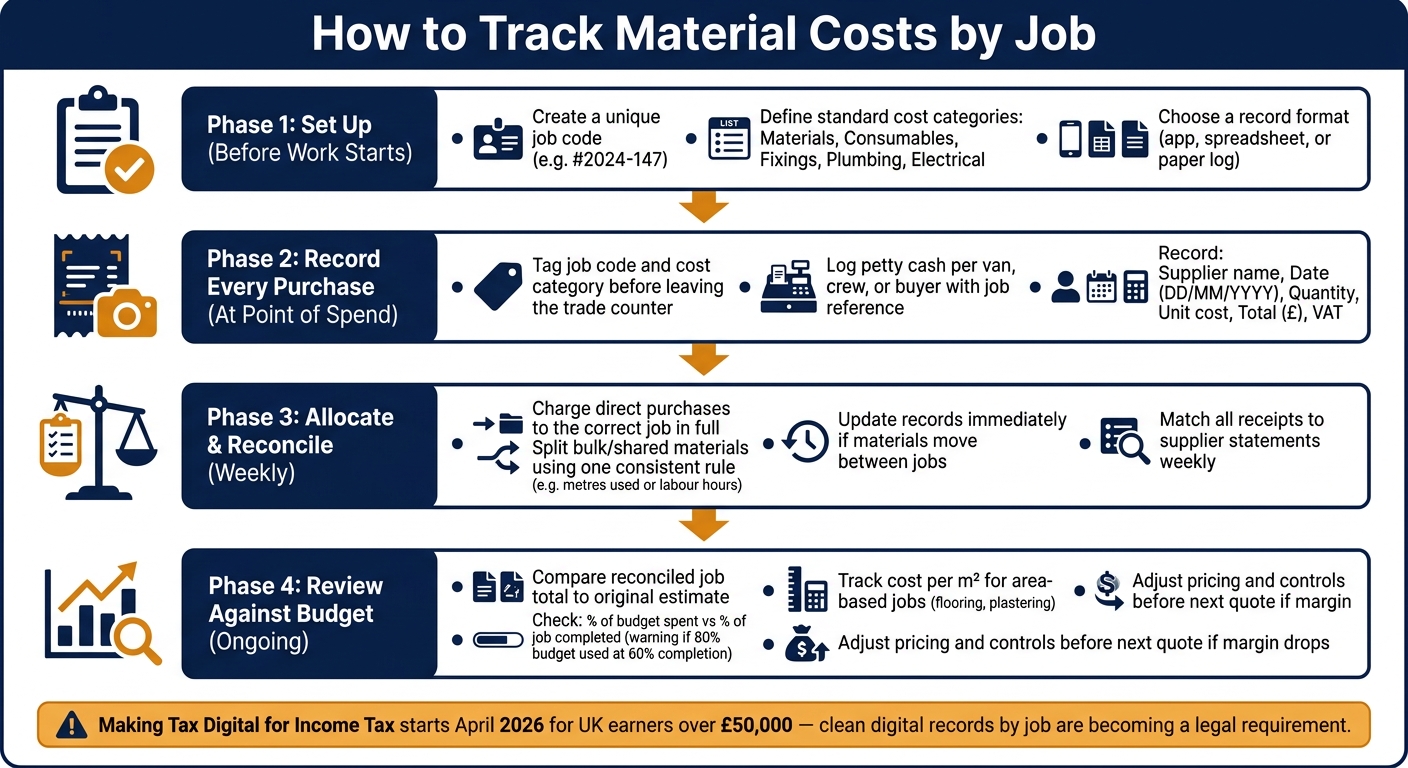
How to Track Material Costs by Job: A Step-by-Step Workflow
TRACKING COSTS - Keeping track of job expenses!
sbb-itb-12417dd
Set up job numbers, cost codes and a simple record system
Before work starts, set up a job code and one standard record format. That way, every purchase goes straight into the right job file from day one. Once the code is live, you can log each spend against it right away.
Use clear job numbers and material categories
Create one job code for each project, such as #2024-147, before the first item is bought. It sounds basic, but this small step stops a lot of mess later on.
Keep cost codes broad and consistent too. Use the same labels across every record, spreadsheet and app:
- Materials
- Consumables
- Fixings
- Plumbing
- Electrical
That setup makes weekly cost checks faster and far less messy.
Record the essentials in UK format
Each material purchase record should include the basics:
- Supplier name
- Date in DD/MM/YYYY format
- Quantity
- Unit cost
- Total cost in £
- VAT amount
Record quantities using standard UK trade units such as mm, metres, m², kg and litres.
Choose a tool your crew will actually use
If entering receipts feels like a chore, people put it off. That’s where mobile receipt capture helps. It cuts out much of the drag from manual entry.
Site Wallet (sitewallet.app) is made for tradesmen and small crews who need to scan receipts, tag expenses by job and keep petty cash in order. If more than one person buys materials, the system should also show which van, crew or buyer made the purchase. Capture receipts on site, tag them there and then, and export the data as CSV or PDF for review.
With the code, categories and record format sorted, the next step is to log each purchase as it happens.
Record every material purchase at the point of spend
Material costs slip through the cracks when receipts aren’t tagged straight away. Once your job codes and cost categories are set up, the next move is simple: record each purchase when it happens, not hours later when the details are fuzzy.
Tag the job before the receipt goes missing
As soon as you pay, add the job number and cost code to the receipt, or assign them in the app, before you leave the site or trade counter.
The same goes for account purchases. Keep the job number linked to the transaction from the start so you can match it later without guesswork.
Scan or photograph receipts on the same day
Paper receipts fade fast, especially thermal till receipts shoved into a van door pocket. Take a photo of the receipt before you even leave the trade counter car park.
Same-day capture helps because the job is still fresh in your mind. You’ll still know which materials were for which job, which phase of the build they belong to, and whether the VAT figure looks right. Keep the image linked to the job code so it’s easy to find later.
Site Wallet lets you scan receipts and tag them to the job on site.
Keep petty cash tied to each van, crew or buyer
Cash purchases are often the first to go missing when they’re not tied to a job. A weekly petty cash total without job-level records is tough to reconcile.
A simple setup works best:
- Assign one petty cash float to each van, crew or buyer
- Log each petty cash spend against the job as soon as it happens
- Record the spender, purpose, job, and balance
That gives you clean figures for the weekly reconciliation and makes missing receipts much easier to spot.
Allocate shared materials and reconcile costs each week
Once receipts are tagged, split shared costs and reconcile them each week.
Assign direct purchases and split shared stock fairly
If you buy materials for one job, charge the full cost to that job. Simple.
Bulk buys are different. If you’re buying fixings, cable or plasterboard that will be used across more than one site, choose one clear rule for splitting the cost and use it every time. That could be metres of cable used or labour hours per job. Then divide the cost in your records and assign each share to the right job code.
Don’t shift materials from one site to another without updating the cost record. If materials bought for Job A end up being used on Job B, change the record straight away. If you leave it, Job A looks more expensive than it is, and Job B looks cheaper than it is.
Once shared costs are split properly, the total for each job stays on track.
Check receipts and supplier statements weekly
A short weekly check is enough to keep job totals right. Match each supplier charge to a receipt. Make sure every receipt has a job tag. And if you use trade accounts, take a photo of the monthly supplier statement and reconcile each line against your tagged receipts in one go.
Site Wallet keeps tagged receipts and supplier statements in the same job file, which makes the weekly check fast.
With a clean job total, checking the budget becomes much easier.
Review spend against budget and tighten the process
Measure actual material spend against the estimate
Once your weekly totals are clean, the next step is simple: check if the job is still on budget.
Do that by comparing the reconciled job total with the original estimate. This is usually where profit starts to slip. When the numbers are right, you can see very quickly whether the estimate still stacks up.
A good rule is to compare how much of the budget is gone with how much of the job is done. If you're 60% through the work but 80% through the material budget, that's a warning sign. Better to spot that mid-job than find out at the end when there's nothing left to fix.
For area-based jobs like flooring or plastering, track cost per m². It's a simple way to catch drift sooner. Live updates help too, because they show overruns while there's still time to act. If a job drops below your target margin, review your pricing and material controls before sending the next quote.
Common tracking problems that cut into profit
Most margin loss on site doesn't come from one huge blunder. It usually comes from small gaps that happen again and again.
| Tracking Problem | Likely Impact on Profit | Corrective Action |
|---|---|---|
| Missing receipts | Incomplete job costs and missed tax deductions | Scan receipts at purchase |
| Wrong job codes | One job looks falsely profitable while another looks like a loss | Require job-based tagging for every purchase before reconciliation |
| Unbilled change orders | Lost margin on extra work | Require signed change orders before any deviation from the original quote |
| Over-ordering | Capital tied up in unused stock; potential for site waste | Reconcile materials delivered against the original estimate each week |
| Commingling costs | One job subsidises another without anyone noticing | Assign every expense to the correct job code on the day it is incurred |
Conclusion: the simplest workflow to keep
The workflow is straightforward: tag every spend, reconcile weekly, then compare it with your estimate.
Site Wallet supports this with mobile receipt scanning, job-based tagging, and records you can export as PDF or CSV for weekly reconciliation and review. And with Making Tax Digital for Income Tax starting in April 2026 for those earning over £50,000, clean digital records by job are no longer just good admin. For many UK tradesmen, they're becoming a legal requirement.
Keep the process simple enough that the crew can stick to it every day.
FAQs
What if I buy materials for more than one job at once?
Split the receipt using project codes or tags, so each item - or part of the total - goes to the right job. That way, material costs stay tied to the work that actually used them.
With Site Wallet, you can tag expenses by job and keep your records clear. The key is consistency at the point of purchase. If your team uses the same tagging system every time, it's much less likely that costs will end up on the wrong job or disappear into overhead.
How often should I reconcile receipts and supplier statements?
Aim to reconcile expenses weekly so your records stay accurate and job costing stays on track. Set aside about 15 minutes each week to review and approve receipts. It’s a small habit, but it helps stop paperwork piling up and makes year-end far less painful.
It’s also worth booking a broader monthly check-in of around 30 minutes. Use that time to review overall financial performance and catch any issues early, before they turn into bigger headaches. Site Wallet can help by capturing receipts and tagging them to specific jobs in real time.
What’s the best way to track petty cash by job?
Track petty cash by job by recording and categorising each expense as it happens. With a mobile-first tool like Site Wallet, you can photograph receipts on the spot, so they don't go missing or fade before you need them.
Tag every receipt to the right job to keep your records accurate and get a live view of project profitability. You can also export everything to PDF or CSV, which makes it much easier to keep records ready for HMRC or your accountant.