
Petty cash records usually go wrong for four plain reasons: missing receipts, late entries, mixed personal spend, and weak job coding. If I want clean records on site, I need to log each purchase that day, keep personal and site spend apart, and add the right job code before I save the entry.
Here’s the short version:
- Missing receipts leave gaps in proof of spend and can stop VAT reclaim
- Late entry leads to wrong totals, forgotten details, and missed duplicate claims
- Personal purchases mixed with site cash distort what a job cost
- No job code at entry makes job costing less reliable
A few facts stand out:
- A delay of 15 to 45 days can make spend harder to check because people forget the detail
- Missing company receipts can block VAT recovery
- Daily checks help spot cash differences before they turn into bigger admin problems
What I’d do in practice:
- Photograph the receipt straight away
- Log the amount, supplier, date, and category before the shift ends
- Keep personal items out of site cash
- Add the job code at the point of entry
- Check cash in hand against the running record each day
This is not about more admin. It’s about doing the small checks at the time of spend so the record still makes sense later.
4 reasons petty cash records go wrong on site
Missing receipts leave gaps in your records
On a busy site, receipts disappear fast.
And once a receipt is gone, the trail goes with it. There’s no clear proof of spend, no VAT record, and no simple way to check the amount or what was bought. That’s when teams end up chasing bits of paper through WhatsApp, email and folders.
It gets worse when the receipt does show up, but it’s in an employee’s name instead of the company’s. In that case, the business can’t reclaim the VAT.
And even if the receipt exists, there’s still another snag: if nobody logs it at the time, the record starts slipping.
Late entries cause forgotten spend and wrong totals
Petty cash records fall apart when entries are made late.
Leave too much time between the purchase and the review, and people stop remembering the details. A gap of 15 to 45 days can blur memory and remove the context needed to check whether the receipt is genuine or whether the amount is right. It also makes duplicate claims much harder to catch.
Put simply, the longer the delay, the shakier the record.
Personal purchases get mixed into site spend
This one causes all sorts of mess.
If personal purchases and site spend come out of the same pot, the record no longer shows what the job actually cost. That muddies the picture for both VAT recovery and cash control.
What should be a clean site expense turns into a guessing game.
Unclear job codes make job costing unreliable
Sometimes the money is recorded, but not tagged properly.
If an entry has no job code, plot reference or phase label, it can’t be assigned later with much confidence. It may still sit in the total, but that doesn’t help anyone work out what the job actually cost.
So the spend is there on paper, but not where it needs to be.
sbb-itb-12417dd
Fixes that keep petty cash records accurate
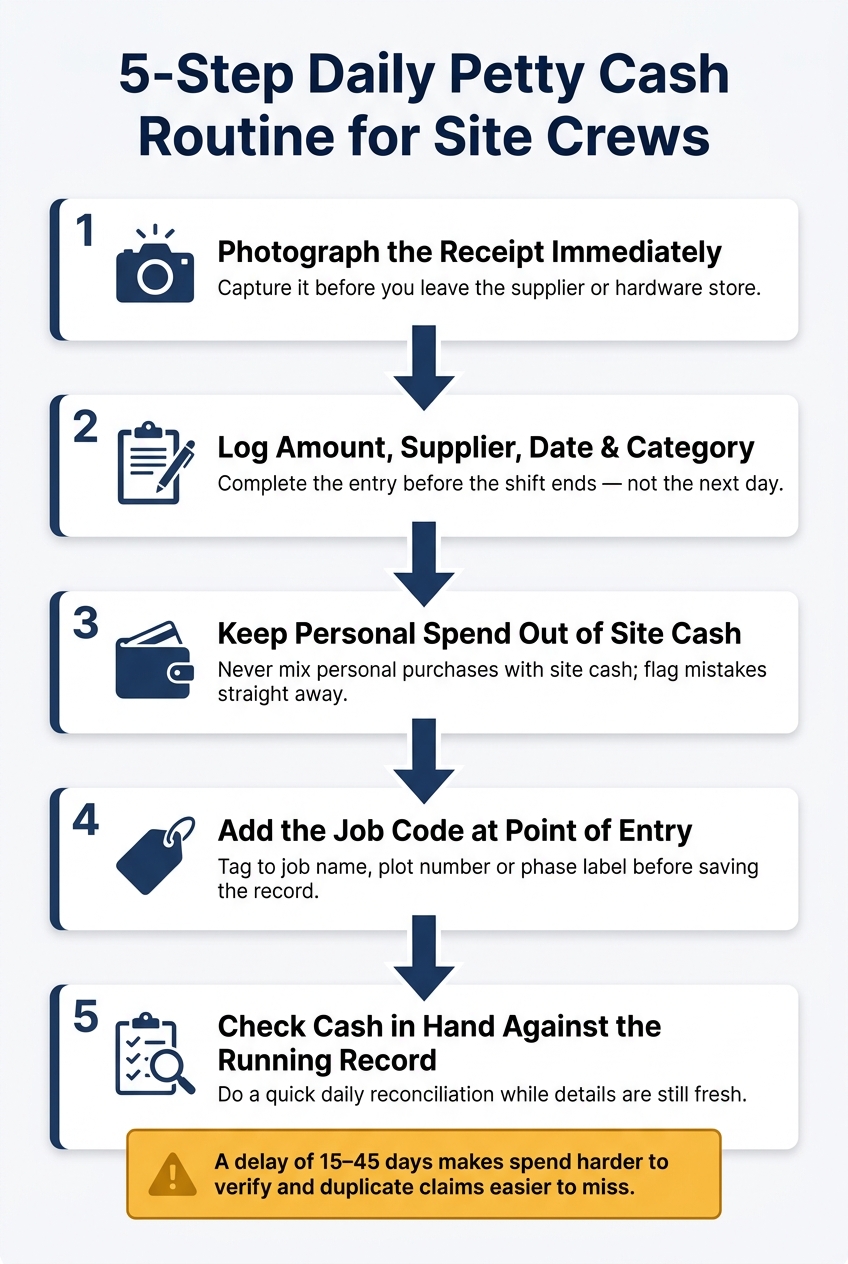
5-Step Daily Petty Cash Routine for Site Crews
These errors usually show up when people leave the paperwork until later. The fix is simple: record each transaction on the same day.
Start with the transaction itself, not the reconciliation.
Log receipts and spend on the same day
The simplest rule is often the one that works best: photograph the receipt and log the spend before the end of the shift. Do it before the shift ends.
Receipt-scanning apps can pull out the supplier, amount and date automatically. That means less manual typing and gets the record done before anyone has even left the supplier or hardware store. Each entry should include the amount, supplier, date and category, so the record stays useful.
Once spend is logged on the day, the next step is just as important: keep personal purchases out of the record.
Keep personal spend out of site cash records
This needs a firm rule, not vague good intentions. Personal items should never come out of site cash. Full stop.
If a genuine mistake happens - someone accidentally buys a personal item with site cash - flag it straight away and record it separately.
The cleanest way to deal with this is to make sure site cash is used only for site purchases. When the money and the reason for using it are kept separate from the start, there's nothing to sort out later.
The last control is the job code.
Require a job code at the point of entry
Every cash entry should have a job code before it's saved - not added later, and not guessed at month-end. Tagging at the point of entry is what makes job costing reliable.
For most crews, a simple naming standard does the job well: job name, plot number or phase label. Using a preset list in a mobile app, instead of free-text fields, cuts out spelling variations and stops the same job from showing up under different names. Site Wallet tags expenses by job at entry, so each transaction is tied to the right job.
If a crew member has to choose a job code before the entry can be saved, the habit forms fast - and the records stay clean.
A repeatable site process that stops the same errors coming back
The aim is simple: build a daily crew routine that spots mistakes before they pile up. In practice, that routine rests on four checks.
Set clear rules for receipts, coding, and daily checks
Keep the daily check simple: receipt, job code, cash balance, and personal spend kept separate.
A quick daily reconciliation - cash in hand against the running record - helps catch discrepancies while the details are still fresh.
Use a mobile record so the admin gets done on site
The easiest way to keep that routine steady is to log each purchase there and then.
A mobile-first record means the admin gets done on site, at the time of purchase, by the person who made it - not back at the office the next morning. Site Wallet is built around that workflow, letting crews log spend and tag jobs on the spot, then export records as PDF or CSV for an accountant or site manager.
Conclusion: accurate petty cash records come from simple daily habits
These four errors point to the same problem: site spend gets recorded too late, too loosely, or not at all.
The answer isn't more admin. It's a tighter daily routine.
Log spend on the day it happens. Keep personal money separate from site cash. Tag each entry to a job code when it's entered. Do a quick daily check, so mistakes get spotted while they're still easy to sort.
That's what keeps the numbers usable.
These habits protect margins, improve cash control, and make reconciliation faster.
A simple mobile record helps keep those habits on site, where the spend happens. A mobile-first record, such as Site Wallet, helps crews stick to that routine while they're on site.
Daily discipline keeps petty cash records accurate.
FAQs
Who should be responsible for petty cash on site?
Petty cash on site needs clear ownership. In plain terms, one person should be in charge. That keeps money from slipping through the cracks and cuts down on record-keeping mistakes.
With Site Wallet, teams can make that role clear from the start. Each expense is scanned, tagged to a job, and logged in real time, so there’s a clear audit trail and far less guesswork later on.
What counts as a valid receipt for VAT?
In the United Kingdom, a receipt only works for VAT purposes if it counts as a VAT invoice.
That means it should clearly show:
- The supplier’s name and address
- The supplier’s VAT registration number
- The date of supply
- The invoice number
- What was supplied
- The net amount
- The VAT rate
- The total VAT charged
If those details are missing, your business may struggle to support its VAT claims. Accurate records make that process much easier.
How often should petty cash be checked?
Petty cash should be checked as often as you can. Leave it for weeks, and things get messy fast. People forget what the spend was for, it becomes harder to tell if a purchase was for work, and inflated or wrong claims are easier to miss.
The best approach is to verify each transaction straight away. Site Wallet makes that easier by letting you scan and tag receipts to job codes at the point of payment, so your records stay up to date and ready for audit.